
Writing your own assignment module
Module customizing
For the assignment module base class to work, there are some requirements. There have to be at least three areas:
-
parent area: in this area, the parent record(s) should be filtered. In the PortfolioWatchlistAssignmentModule, e.g., the portfolio is the parent.
-
source area: the area where all the child records are displayed. In the case of the PortfolioWatchlistAssignmentModule, all projects that are assigned to the current portfolio are displayed
-
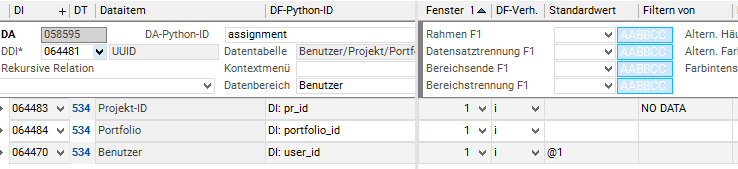
assignment area: in this area, new assignment records are created, the value of each data field is filled by looking for a matching data field with identical python id in the parent or in the source area. If no matching python id is found, the field will be ignored. The values can also be filled using a default value in the customizing of the data field.

-
The project id and portfolio id are filled by looking up the values in the source and parent areas
-
In the source area there is a datafield with python id pr_id
-
The portfolio id, on the other hand, is not in the source area and will thus be filled from the parent area, which contains a datafield with the python id portfolio_id
-
-
Since the records are inserted on mts level we can also use default values, in this example the watchlist that is edited is always that of the currently logged in user, so we can use @1 as default value for the user_id
Necessary methods
To create your own assignment module there are some methods that need to be implemented:
-
open_module_for_parents: This method opens the assignment module and should also do some checks:-
Check that assignment data is available using
check_for_assignment_data -
Make sure that all other criteria are met to make an assignment, e.g. that a stakeholder record exists
-
If a check fails
Noneshould be returned and if theshow_messagesparameter is set, there should also be a proper error message
-
-
is_assigned: This method is necessary to check if an assignment already exists and needs to be implemented for each assignment individually -
id_field_py_id: This property should return the data field python id of the ID field by which a source record can be identified unambiguously, in the example below this is the project id -
make sure that the other properties match your customizing names and requirements
Example implementation from the PortfolioWatchlistAssignmentModule :
class PortfolioWatchlistAssignmentModule(AssignmentModuleBase):
    @property
    def no_data_available_message_id(self):
        return '1195'

    @classmethod
    def open_module_for_parents(cls, parents=None, show_messages=True, **kwargs):
        if parents and not isinstance(parents, list):
            parents = [parents]

        mod_obj = ppms.get_target_module()
        target = get_global_setting_value('edit_portfolio_watchlist', 'alpha120')
        with ppms.echo_disabled():
            target_mod_obj = mod_obj.open_module(target)
            target_mod_obj.set_current_L_var(16, parents)
            target_mod_obj.menu(MENU_FILTER)
            if not target_mod_obj.check_for_assignment_data(show_messages=show_messages):
                target_mod_obj.menu(MENU_CLOSE)
                return None
        return target_mod_obj

    @property
    def id_field_py_id(self):
        return 'pr_id'

    @staticmethod
    def is_assigned(parent_id, child_id):
        user = ppms.uvar_get('@1')
        assignment_record = ppms.search_record(534, [child_id, parent_id, user], ['uuid'])
        return bool(assignment_record)
Implementation for using marked records and working with radio buttons
Radio Buttons
There is no native radio button type in planta, so we need to implement a value range which ensures that only one record is selected at a time. To create a radio button in your table the following steps are required:
-
Create a normal yes/no type virtual data item
-
Implement a value range which unchecks all other mts records in the processInput
Here is an example value range from the standard implementation:
def di065272_chosen_for_assignment_radio_checkInput(di, oldvalue):
    """This value range simulates a radio button."""
    records = di.get_dfs()[0].get_record().get_da().get_records()
    for record in records:
        if record.chosen_for_assignment_radio.get_raw_value():
            record.chosen_for_assignment_radio.set_raw_value(0)
    return di.get_value()

di065272_chosen_for_assignment_radio_checkInput.deps = ("",)
Marked records
In the standard implementation there are no assignment modules left which use marked records for selection. If you're still required to implement such a module you have to overwrite the get_source_records method. The method should return an iterable of all mts records which are marked in the source area.
The method has an optional parameter ids. If you want to use the static method for assigning records, you have to make sure that all source records with ids within the ids list are also returned. The key field for the comparison is defined in the property id_field_py_id.
Classes
AssignmentModuleBase
Methods
|
Function |
Parameters |
Return Value |
Description |
|---|---|---|---|
|
AssignmentModuleBase.after_insert |
|
|
Is called after all inserts are done. Used to close the module and filter in the invoker module to show the new assignment data |
|
AssignmentModuleBase.assign_marked_records |
applied_dfc: Applied data field customizing
|
|
The method which is called when pressing the assignment button. Invokes the creation of new assignments |
|
AssignmentModuleBase.check_for_assignment_data |
show_messages: Whether a message box is shown which informs that there is no assignment data should be shown |
|
This method should be called in the |
|
AssignmentModuleBase.click_assignment_button |
|
|
Programatic way of clicking on the assignment button. Used in regression tests |
|
AssignmentModuleBase.get_parent_records |
|
All parent records in the module |
|
|
AssignmentModuleBase.get_source_records |
ids: Can be used to retrieve all source records with the given IDs |
List of all marked source records as |
Used to retrieve all relevant source records which need to be assigned |
|
AssignmentModuleBase.get_value_from_source_or_parent |
parent_mts_record: The parent |
The value for the given df python id |
|
|
AssignmentModuleBase.insert_into_assignment_table |
parent_mts_record: Parent |
The new assignment |
Creates and fills the new assignment record, also saves the record if possible |
|
AssignmentModuleBase.on_load |
|
|
Filters and resets all checkboxes so that nothing is checked when the module is opened |
|
AssignmentModuleBase.reset_dummy_record_checkbox |
|
|
Resets all checkboxes |
Classmethods
|
Function |
Parameters |
Return Value |
Description |
|---|---|---|---|
|
AssignmentModuleBase.assign_children_to_parent |
children_ids: The ID of the child record to assign
|
|
A static method to assign children records to a parent |
|
AssignmentModuleBase.open_module_for_parents |
parents: The parent ids for which the module is opened
|
The |
Needed in every assignment module, is e.g. also used for the static assignment method |
Staticmethods
|
Function |
Parameters |
Return Value |
Description |
|---|---|---|---|
|
AssignmentModuleBase.get_all_dfs_from_area |
mts_record: |
Returns a list of all df python ids in the record |
|
|
AssignmentModuleBase.is_assigned |
parent_id: ID of the parent record
|
|
|
Properties
|
Property |
Getter |
Setter |
Description |
|---|---|---|---|
|
AssignmentModuleBase.assignment_button_da_id |
|
|
The data area python ID where the assignment button is located |
|
AssignmentModuleBase.assignment_data_area |
|
|
The data area python ID of the data area where the new assignment record is inserted |
|
AssignmentModuleBase.button_df_id |
|
|
The button data field ID of the assignment button |
|
AssignmentModuleBase.checkbox_python_id |
|
|
The python ID of the checkbox to mark source records |
|
AssignmentModuleBase.id_field_py_id |
|
|
The data field python ID with which source records can be identified |
|
AssignmentModuleBase.no_data_available_message_id |
|
|
The message ID which is displayed when |
|
AssignmentModuleBase.parent_data_areas |
|
|
List of data areas where the data area python id starts with "parent" |
|
AssignmentModuleBase.source_data_areas |
|
|
List of data areas where the data area python id starts with "source" |
RadiobuttonAssignmentModuleBase
Properties
|
Property |
Getter |
Setter |
Description |
|---|---|---|---|
|
RadiobuttonAssignmentModuleBase.checkbox_python_id |
|
|
Data field python id of the radio button |
StakeholderAssignmentModuleBase
Staticmethods
|
Function |
Parameters |
Return Value |
Description |
|---|---|---|---|
|
StakeholderAssignmentModuleBase.stakeholder_exists |
member_id: Member ID of the stakeholder |
|
Check if a stakeholder record exists, needed for some assignments |