
Hybrid Protocol MOD009DRA
Access
Project panel → Dashboard → Click on the symbol
 in the project header → Hybrid Protocol
Project panel → Further... → Miscellaneous → Hybrid Protocol
Information
Here, the requests of an object which are to be sent to an external system are protocoled.
Details
The module shows all tasks/resource assignments from the schedule which are relevant for an external system. Next to each object, the
 icon is displayed which serves to open a protocol module with the actions recorded for the respective object: Hybrid Protocol Actions.
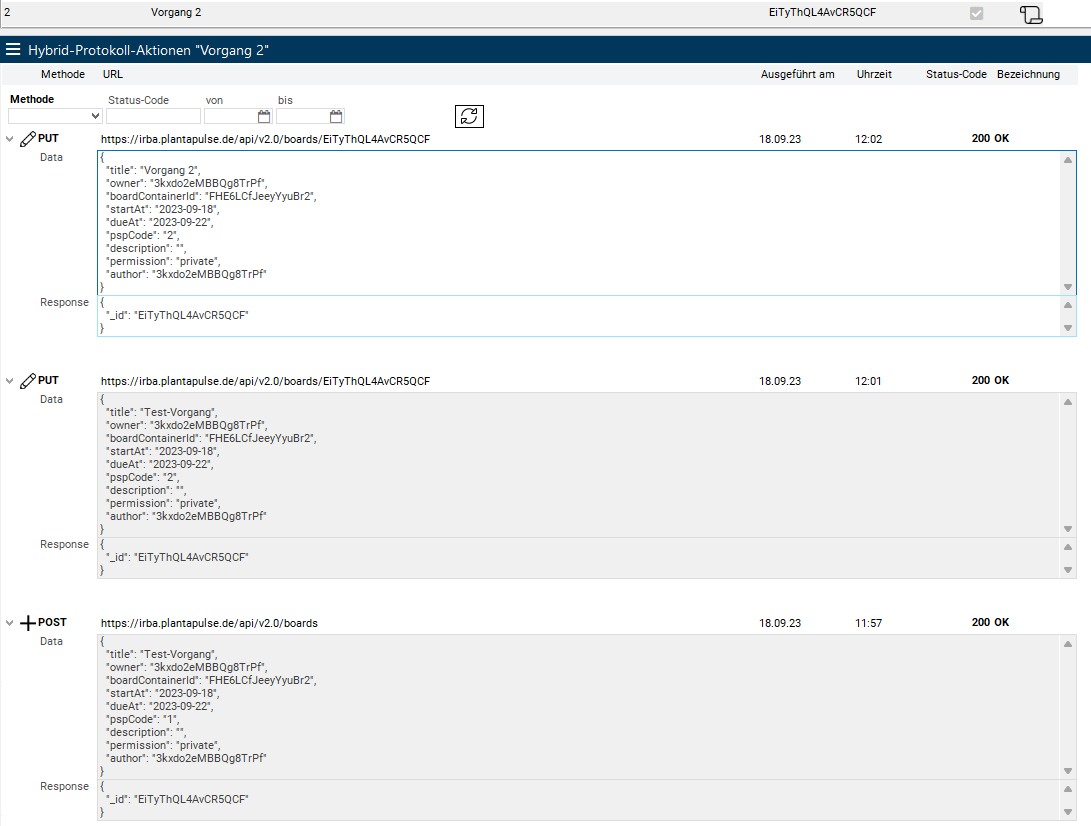
Via the protocol you can monitor how a synchronized record has been changed over time.
Example
1) The record was created with a POST with WBS code "1"
2) The record was updated with a PUT and the WBS code was changed to "2".
3) The record was refreshed again and the task name was changed from "Test Task" to "Task 2".
Note
If a request is repeated and the same error is triggered, no new record is created but the most recent record is updated. A new record is only created if something changes in the transmission.