
Information
-
PLANTA secure provides a higher standard of security using the two-factor authentication (2FA) which is recommended by the German Federal Office for Information Security.
-
For more information, please contact your PLANTA consultant.
PLANTA secure Components
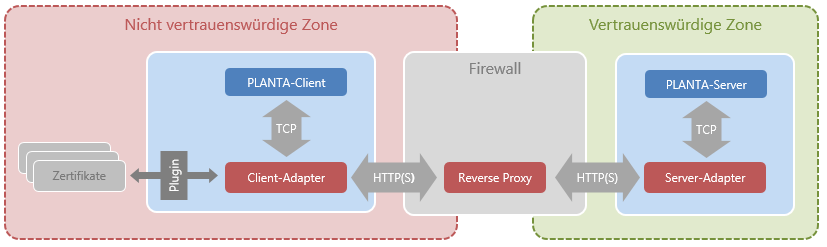
Installation Instructions
Information
-
The server adapter must be configured as described in the corresponding section below and must be made available in a server container. A direct TCP connection to a preexisting PLANTA Server and authentication for single sign-on via proxy are required.
-
Once you have set the application configuration as outlined in the corresponding specific section below, the Client Adapter can be used as-is. An existing PLANTA Client must be available.
-
Common authentication methods of the company, like smart cards, can be addressed via respective plug-ins. For more information, please contact your PLANTA consultant.
PLANTA Server
From S 39.5.37
Information
-
The configuration of the PLANTA server does not need to be changed.
-
In the
ppms.proxy_authPython module, there is a predefinedproxy_auth_resolve_username(proxy_user) method which called by the Server. It is supposed to return the PLANTA user e-mail for logging in to the system. The default implementation will pass on the proxy user e-mail.
Details
-
The server adapter is now integrated in the server and runs as a servlet in an integrated application server.
-
This feature must be activated via the license file.
-
The configuration is adjusted in the following files:
config/globals.conf, config/secure.confandconfig/ldap.conf -
The server adapter has been extended by authentication via LDAP. This also requires a current ClientAdapter.
Server Adapter
From S 39.5.31
Information
-
The server adapter comes as a Java Servlet that can be configured
-
Backend: is automatically copied from
globals.conf. -
Other settings are to be adjusted in
config/secure.conf. -
The LDAP interface settings are summarized in
config/ldap.conf. -
Logging: has been integrated in the
config/logback.xmlof the server.
-
Details
-
In order to satisfy security requirements, this application server instance must be configured in a way that only trusted requests from the reverse proxy are allowed, i.e. HTTPS with mutual authentication.
-
The TCP connection between server adapter and PLANTA Server is not encrypted by default. SSL can be activated by carrying out the following steps:
-
replacement of
keystore.jksandtruststore.jksin theconfigdirectory -
execution of
planta_sslas a back-end protocol and -
configuration of the respective password in
config/secure.conf
-
Reverse Proxy
Information
-
The BOSH protocol, which is used by PLANTA to establish a connection, does not work with HTTP pipelining and is disabled in the Client Adapter. Hence, the reverse proxy must not employ HTTP pipelining when forwarding requests to the Server Adapter.
-
Persistent connections as of HTTP 1.1 / keepalive should be enabled for improved latency and throughput, esp. when using SSL-encrypted connections.
Details
-
The value specified for bosh.session.max_wait in the servlet's config.properties is the lower bound for the reverse proxy's read timeout; otherwise polling requests may be aborted with a 504 gateway timeout error.
-
This can just as well be taken care of the other way around - if a lower maximum request timeout is desired, max_wait should be slightly below that value in order for polling requests not to run into trouble.
-
-
If proxy authentication is enabled in the Server Adapter, the name of an HTTP header containing the user ID can be configured. The value of this field is passed on to the PLANTA Server as-is. Further processing is subject to customizing. See the "PLANTA Server" section for further information.
Here is a sample nginx configuration excerpt for a working reverse proxy setup
http {
    server {
        location /planta {
            # servlet location as defined during deployment
            proxy_pass http://servletcontainer.example.com:8080/PLANTAServerAdapter/;

            # read timeout needs to be be set >= the value of
            # bosh.session.max_wait in the servlet's config.properties, which
            # defaults to 900
            proxy_read_timeout  900s;

            # persistent connections as per http keepalive improve both latency
            # and throughput, esp. with SSL connections
            proxy_http_version  1.1;
            proxy_set_header Connection  "";

            # just push some dummy value as proxy-authenticated user
            proxy_set_header iv-user nobody;
        }
    }
}
Client Adapter
From C 39.5.31
Information
-
The Client Adapter is integrated in the PLANTA Client and can be configured in the planta.ini.
-
The Client Adapter will pass on all command line arguments to the client. A potential server= parameter will be removed since the Client Adapter provides its own host and port, effectively rerouting the client connection to itself.