
Information
-
Here you will find a description of programmable triggers, their function, and how they can be created.
General
Information
-
The objective of the use of programmable triggers is to control the system behavior as far and flexibly as possible and.
-
Programmable triggers are to call any function required (in Python, Jython, or Java) by fixed parameters.
-
In the long run, programmable triggers are to replace customizing exits by more powerful and simpler structures.
Details
-
There are four types of triggers:
-
Data-driven triggers are triggers which are run when data is written.
-
Time-controlled triggers are executed at a particular point in time, independent of other triggers.
-
Startup triggers are only run once upon server start regardless of the saving procedure.
-
Session startup triggers, however, are executed each time a user logs on to a new session.
-
-
All programmable triggers are saved in DT312 Triggers.
-
If this table does not exist or if the framework cannot be started for another reason (e.g. because the Jython interface does not work), the server will not be started. In such a case, a log entry will be written which indicates that the trigger framework could not be loaded, the respective migration packet is to be run and that, should the error still occur, the PLANTA customer service is to be notified.
-
-
Both trigger types have the same parameters, e.g. UUID, function type, parameter, and type-specific parameters. For a list and description of the individual parameters, see here.
-
As far as the selected language in which trigger functions are written is concerned (function type),
-
Java events are only to be defined for system-oriented application.
-
Python events have access to the full range of Python functionality. However, they require a running server (i.e. no plain web application).
-
Jython events can be run in web applications and on regular servers.
-
-
-
For the management of triggers, PLANTA provides the following modules in the system customizer:
Note
-
No programmable triggers are started while the server runs in special modes (import, export, migration, and during scheduling).
Data-Driven Triggers
Information
-
Data-driven triggers (or data triggers) can be defined for every database table.
-
Data-driven triggers receive the trigger itself as a parameter (for meta information on the trigger behavior) as well as the object to be saved (which can be manipulated by the trigger). This object is either a DtpRecord (in Python) or a Pojo object, as it has been defined in the target folder (in Java and Jython).
-
DtpRecords and Java-Pojo objects present different views on the same database records.
-
-
Please note that data-driven triggers can only be defined for a table as a whole and not for a particular trigger.
-
Whether the trigger is then to be actually executed must be checked by the trigger function itself (via the name of the property to be changed) or via the Condition parameter.
-
-
Here you can find information on additional parameters for data-driven triggers.
Trigger Types
Information
-
The following trigger types are available for data-driven triggers:
-
pre-insert/pre-update/pre-delete
-
These trigger types are executed for insertion/update/deletion processes before saving.
-
-
post-insert/post-update/post-delete
-
These trigger types are executed for insertion/update/deletion processes after saving.
-
-
pre-save/post-save
-
These trigger types are executed for insertion/update processes before or after saving.
-
A pre-save-trigger is both a pre-insert and a pre-update trigger.
-
A post-save-trigger is both a post-insert and a post-update trigger.
-
-
-
On-change
-
This trigger type is run before saving whenever a data field is changed. Particularities are explained here.
-
-
-
Pre-functions are executed before saving and allow you to change the record to be saved again or to abort saving (via the return value).
-
Post-functions are executed after the records have been saved. They serve to adjust a record (or other objects) after saving has been completed successfully.
Notes
-
Pre-trigger-methods and on-change-trigger-methods can return a boolean value. The change is only carried out if this value is not
False. -
Post-delete triggers currently do not work in Python (further information).
Particularities of On-Change-Triggers
Information
-
On-Change-Triggers are data-driven triggers which are carried out each time a data field is changed - i.e. before saving.
-
They therefore resemble value ranges but are more flexible since they are initiated by both Jython and Python just like any other trigger.
-
Methods which are called by on-change-triggers (Jython or Python) have the name of the property which is to be changed as a parameter in addition to the usual data-trigger parameters (the trigger itself as well as the pojo object to be changed or the DtpRecord to be changed) as well as the old and new value of the property.
Processing of Data-Driven Triggers
Information
-
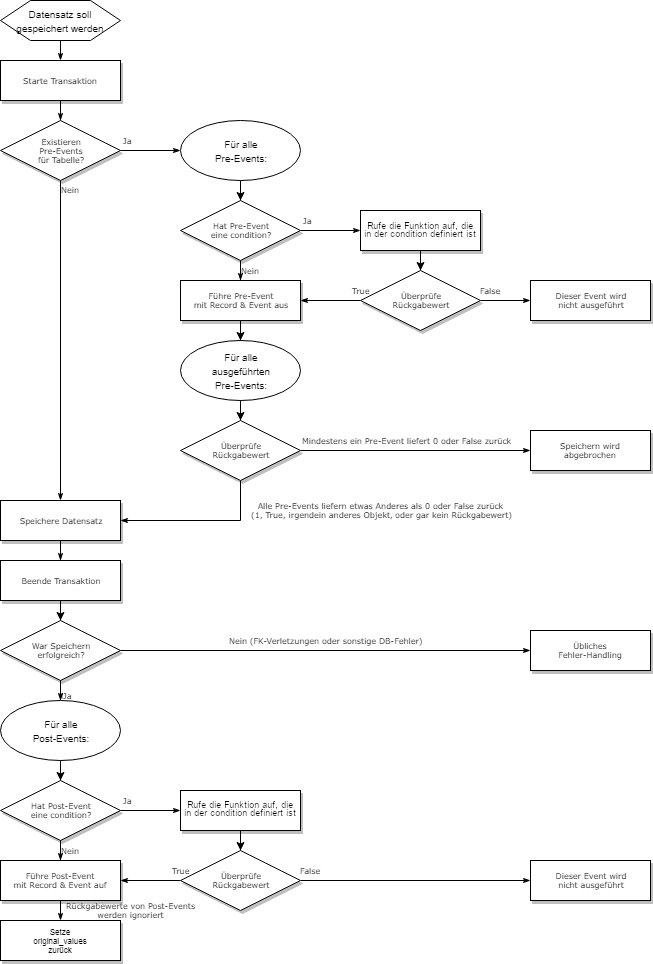
Data-driven triggers are run within the client or web session which has caused the trigger to be saved.
-
Data-driven triggers are each opened with a DtpRecord (for Python events) or with the pojo object (for Java & Jython) which is to be saved. They correspond exactly to the existing DtpRecord class or to the pojo objects as they have been defined in the target directory.
Important
-
It is recommended that the pre-function itself do not carry out any save-actions since they are opened after the transaction has already been started and the saving procedure would then be triggered again.
-
In case, contrary to the recommendation, pre-functions carry out save-actions, there is a mechanism which aborts infinite loops after ten recursions.
-
-
Pre-functions are designed for two purposes:
-
to check whether saving is actually permitted (by return value). If this is
False, saving will be aborted. This does not lead to a rollback or exception since the changes for possible corrections are to be retained.-
When saving from Python,
dtp_record.save()simply returns 0 orfalse. The handling lies within the responsibility of the trigger itself or the saving function. -
If there are multiple pre-triggers, no further triggers will be carried out after an trigger has returned
false. (This is the default handling approach of "and” operators, e.g. in Java, Python, or C.)
-
-
Adjust settings once more. Each change made here will later be written automatically.
-
-
Saving in Post-Triggers is less critical since the transaction has already been abandoned here. However, infinite loops are generally possible here as well. They will also be aborted after 10 recursions.
Changed properties
-
A particular functionality for triggers is the option to retrieve all changed fields of the DtpRecord or the changed properties of the pojo object including the original value of a field. Original values are saved as soon as an object has been updated (e.g.
DataItem.setvalue()). -
Original values are reset as soon as all post-triggers have been run (see chart above).
To learn how you can create startup triggers, please refer to the description of the Data-Driven Triggers module.
Time-Controlled Triggers
Information
-
Time-controlled triggers are executed at a defined point in time regardless of saving.
-
Since the triggers are not linked to records, they receive the trigger as a parameter but no DtpRecord and no pojo object.
-
Here you can find information on additional parameters for time-controlled triggers.
Processing of Time-Controlled Triggers
Information
-
Time-controlled triggers are also executed when no client sessions are registered on the server.
-
Consequentially, time-controlled triggers are executed directly in the global server session. Realizing them via the
java.util.Timerstandard Java-class assures that each trigger runs in its own Java thread and thus (e.g. in an infinite loop within the trigger function or similar) does not block the server. -
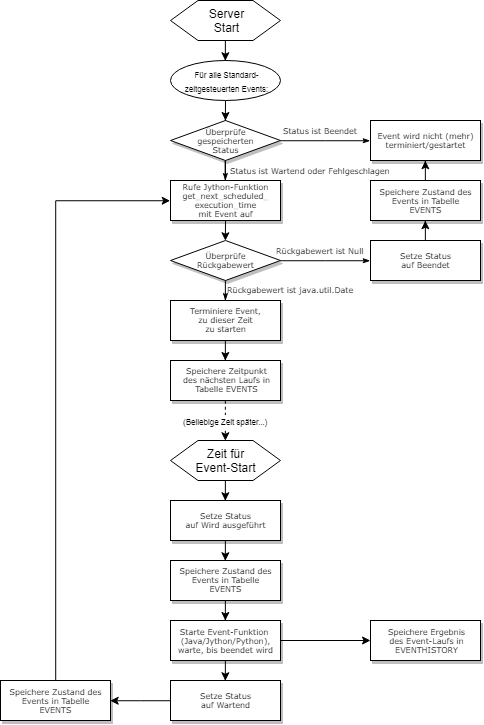
When starting the server, all already existing time-controlled triggers are scheduled for start (as far as they are active and their Status permits it).
-
Currently, only Jython or Java functions for time-controlled triggers are accepted.
-
Since the triggers are currently run in the global server session, the variables of the user session, which are deemed a given in customizing, are missing here. Code which would normally calculate the user rights by means of the user variable does not run within triggers.
-
-
Time-controlled triggers can have four statuses (specified in the Status parameter):
-
0 Waiting: The trigger is currently scheduled to run (again) at a later point in time.
-
1 Is running: The function assigned to the trigger (Java or Jython) is currently running.
-
2 Terminated: The trigger has been terminated without errors and will not be run again.
-
3 Failed: An error has occurred during the last execution. The trigger will be executed again after server restart.
-
-
When starting the server, all active time-controlled triggers are scanned.
-
Triggers with Terminated or Is running status are not executed again.
-
All triggers with Waiting and Failed status are now started and enter their life-cycle:
Scheduling of Time-Controlled Triggers
Information
-
Triggers have a start date and a start time and support different intervals of recurrence.
-
Possible interval modes (are specified in the Recurs parameter)
|
Interval |
Description |
|---|---|
|
Once |
The trigger is executed once at the planned point in time and does not recur. |
|
Hourly |
The trigger recurs every hour. |
|
Daily |
The trigger recurs every day. |
|
Weekly |
The trigger recurs every seven days. |
|
Monthly |
The trigger recurs the next month on the same week day, e.g. on the first Monday or on the last Friday of a month. |
|
Yearly |
The trigger recurs on the same date in the following year. Triggers on 02/29 only recur in leap years |
|
User-defined |
A user-defined interval is specified. This allows for a more detailed configuration. |
-
In User-defined mode, the user has the following configuration options:
-
The number and unit of the interval of recursion in one of the existing units: minutes / hours / days / weeks / months / years
-
On which weekdays the trigger may be executed
-
When the trigger is to be terminated (multiple selection not possible): never / at a defined point in time / after a defined number of executions
-
Implementation
-
The
get_next_scheduled_execution_timeJython scheduling function is located at<server directory>/jython/server/events/event.py. -
It is called upon server start in order to schedule all time-controlled triggers once and every time a time-controlled trigger has been executed.
-
It returns a
java.util.Datewhich specifies the point in time at which the trigger is to be executed again. -
If it returns the
Nonefunction, the trigger switches to the "Terminated" status and will not be executed again.
-
-
The
get_next_event_executionfunction is called from the customizing name space under<server directory>/jython/customizing/eventsbyget_next_scheduled_execution_time. -
It carries out the calculation of the next time of execution according to the configuration.
-
If the trigger has never been executed before, the configured start time is used to calculate the time of execution.
-
If the trigger has at least one history entry, the planned time of the last trigger will be used.
-
Sequence of trigger execution
-
The sequence of trigger execution is stored in data table 313 Trigger history.
-
It is used to determine the next time of execution.
-
To learn how you can create startup triggers, please refer to the description of the Time-Controlled Triggers module.
Startup Triggers
Information
-
Startup triggers are only run once upon server start regardless of the saving procedure.
-
Since the triggers are not linked to records, they receive the trigger as a parameter but no DtpRecord and no pojo object.
-
They can be understood as streamlined time-controlled triggers (i.e. time-controlled triggers without information on when they are to be run).
Startup Trigger Process
Information
-
Startup triggers are executed automatically as soon as the PLANTA Server has been restarted and initialized.
-
Like time-controlled triggers, startup triggers are also executed in the global server session.
-
They are executed one by one according to the Position column of the Triggers table.
-
Any errors when executing startup triggers are noted in the log file.
-
As with time-controlled triggers, only Jython or Java functions are currently accepted for startup triggers. Startup triggers of the "Python" type are not executed.
-
However, there is the option of executing a Python module via the
customizing.events.module.run_moduleJython function, which is then executed in a clientless session (as with time-controlled triggers).
-
To learn how you can create startup triggers, please refer to the description of the Startup Triggers module.
Session Startup Triggers
Information
-
Session startup triggers behave similarly to (server) startup triggers, but are executed each time a user logs on to a new session (not a clientless session).
-
They each have only one parameter, the trigger itself.
Session Startup Trigger Process
Information
-
Session startup triggers are executed automatically as soon as a user has logged into a client or Web Client, as soon as the user menu is available (at this point, any Python code can be executed).
-
Unlike (server) startup triggers, session startup triggers can also execute Python functions in addition to Jython or Java functions.
-
Session startup triggers are executed within their session, the name of the logged-in user is available as a property of the trigger.
-
They are executed one by one according to the Position column of the Triggers table.
-
Any triggers when executing startup triggers are noted in the log file.
To learn how you can create startup triggers, please refer to the description of the Startup Triggers module.
Extension of Python Functionalities
-
In the course of the implementation of programmable triggers, the Python API has been extended by the following functions:
-
In DtpRecord:
-
get_changed_dis: Returns a list of all data items the values of which have been changed. -
get_dis: Returns a list of all data items of the record.
-
-
In DataItem:
-
has_been_updated: Returnstrueif this data item has been updated. -
get_original_value: Returns the saved, initial value. If the data item has not been updated, the current value is applicable.. -
get_original_tech_value: Returns the saved, initial technical value (analogously toget_tech_value).
-
-
Jython Functions on the Configuration of Time-Controlled and Startup Triggers
With the functions customizing.events.module.run_module and customizing.events.module.run_module_persistent_session, time-controlled or startup triggers can be easily configured. Find further information under Time-Controlled Triggers and Startup Triggers.