
The user_interface package provides various functions for common use cases with message boxes.
Classes
Button
Static variables
|
Variable |
Description |
|---|---|
|
Button.YES |
Text constant for "Yes" |
|
Button.NO |
Text constant for "No" |
|
Button.OK |
Text constant for "OK" |
|
Button.BACK |
Text constant for "Back" |
|
Button.PREVIOUS |
Text constant for "Previous" |
|
Button.NEXT |
Text constant for "Next" |
|
Button.SELECT |
Text constant for "Select" |
|
Button.CANCEL |
Text constant for "Cancel" |
ButtonList
Static variables
|
Variable |
Description |
|---|---|
|
ButtonList.YES_NO |
Constant for getting a =["Yes", "No"]= button list from ButtonList.get_button_text_from_value() |
|
ButtonList.OK_BACK |
Constant for getting a =["Ok", "Back"]= button list from ButtonList.get_button_text_from_value() |
Classmethods
|
Function |
Parameters |
Return Value |
Description |
|---|---|---|---|
|
ButtonList.get_button_text_from_value |
value: One of the values defined in the static variables of this class |
A list or |
Retrieves a list populated with text constants for use in message boxes |
Functions
|
Function |
Parameters |
Return Value |
Description |
|---|---|---|---|
|
ask_for_confirmation_via_dialog |
dialog_message_id: MSG |
|
Displays a dialog message and checks whether the reply is positive |
|
ask_user_for_confirmation |
message_text: The text that should be displayed
|
|
Displays a message and checks whether the reply is positive. |
|
ask_user_for_input_via_dialog |
dialog_message_id: MSG
|
User input |
Asks the user for input. The dialog message should be configured to have 1 input field. The |
|
ask_user_to_select_from_list |
possible_values: An iterable of values
|
An object from the iterable of values or None |
Displays a list of objects in a message box and lets the user choose one of the elements. |
|
show_custom_dialog_message |
dialog_message_id: The dialog message to replicate
|
|
Displays a dialog message with a custom text. |
|
ask_user_to_select_from_objects |
message: message that you want to show
|
|
Presents the user with a dialog where he/she can choose from multiple replies. |
Examples
Utilizing ask_user_for_confirmation
from ppms.user_interface import ask_user_for_confirmation, ButtonList

message_text = 'Should something be done?'
if ask_user_for_confirmation(message_text=message_text, button_enum=ButtonList.YES_NO)
    # Do something...
Utilizing ask_for_confirmation_via_dialog
from ppms.user_interface import ask_for_confirmation_via_dialog

if ask_for_confirmation_via_dialog('1110'):
    # Do something...
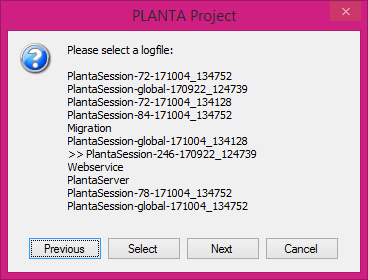
Select a logfile and display the last 1000 characters
The selection box will look like this:
import os

from ppms.user_interface import ask_user_to_select_from_list


def get_all_logfiles():
    return [logfile for logfile in os.listdir('log') if logfile.endswith('.log')]

def ending_stripper(logfile):
    return logfile.rstrip('.log')


logfiles = get_all_logfiles()
selected_logfile = ask_user_to_select_from_list(possible_values=logfiles, heading='Please select a logfile:', transform_value_to_text=ending_stripper)

if selected_logfile is not None:
    logfile_path = os.path.join('log', selected_logfile)

    with open(logfile_path, encoding='utf-8') as f:
        content = f.read()[-1000:]

        ppms.ui_message_box(content)
Asking the user for a valid port number
from ppms.user_interface import ask_user_for_input_via_dialog

# A port must be a valid integer
def _port_checker(port):
    try:
        int(port)
    except ValueError:
        return False

    return True

port = ask_user_for_input_via_dialog(dialog_message_id='1242', verification_function=_port_checker)
if port is not None:
    # Do something with the port number