
Information
-
If you want to enable a hierarchical structure and data display in a user module, you can do so by customizing a structure and a structure display.
-
Below, you will find an explanation of structure customizing.
-
For information on the customizing of structure display, please refer to
Relational Structures (Structures via Relations)
Information
-
Via relations, logical relations between data are established.
-
Relations can be defined in data tables (system customizing) or in modules (module customizing).
Define Relations via System Customizing (in Data Tables)
Information
-
Data tables can be linked via relations.
-
The relations are defined per data table in the Data Dictionary module with the parameters of DT416 Relation.
Example
-
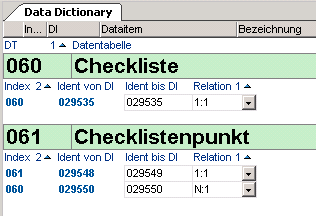
Data tables 060 Checklist and 061 Checklist item are connected via an N:1 relation.
-
I.e. you can assign several checklist items to any checklist but each checklist item only belongs to one checklist.
-
The checklist item data table is subordinate to the checklist data table.
-
Define Relations via Module Customizing (Data Area Assignment)
Information
-
In a module, data from different data tables that have no data table relation, e.g. DT461 Project and DT467 Resource, can be displayed linked and structured.
Procedure
-
Create the data areas from different data tables and assign them to the required module.
-
Structure data areas (connect relationally):
-
Insert the relation to the parent area for the child data area in the Relation to parent area parameter.
-
Note
-
Via relations, data tables which contain application logically interrelated data items, can be linked. For example, the project manager (DT461) can be linked to the resource (DT467), but not to the cost element (DT470).
Recursive Structures
Information
-
One speaks of recursive structures (also recursive relation) if data of a data table has a hierarchical relation to other data of the same data table.
-
This can be done via the Recursive relation parameter
-
Example
-
Task (DT463)
-
Child task (DT463)
-
Structuring via Recursive Relation
Information
-
Object and object structure data are contained in the same data table (e.g. task and parent task: both DT463).
Procedure
-
Define the relation entry for the relation between the object and its subobjects in the Recursive relation field in the required data area.
Example
-
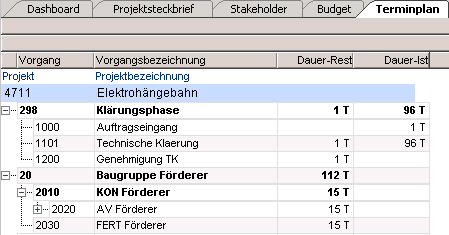
Relation entry in the Task data area of the Schedule module for structuring the tasks

-
Results in the module
Note
-
The function, that the width of the first field was automatically extended (in this case the fields of the task ID), only applies to data areas with horizontal layout.