
What does the module subclass do?
-
The module subclass serves to extend a module to include new functions and attributes.
-
If you try to open a function which does not exist in the module subclass, it will be searched for in the "real" module instance.
-
By means of this facade, modules can easily be extended by further functions.
Theory
Information
-
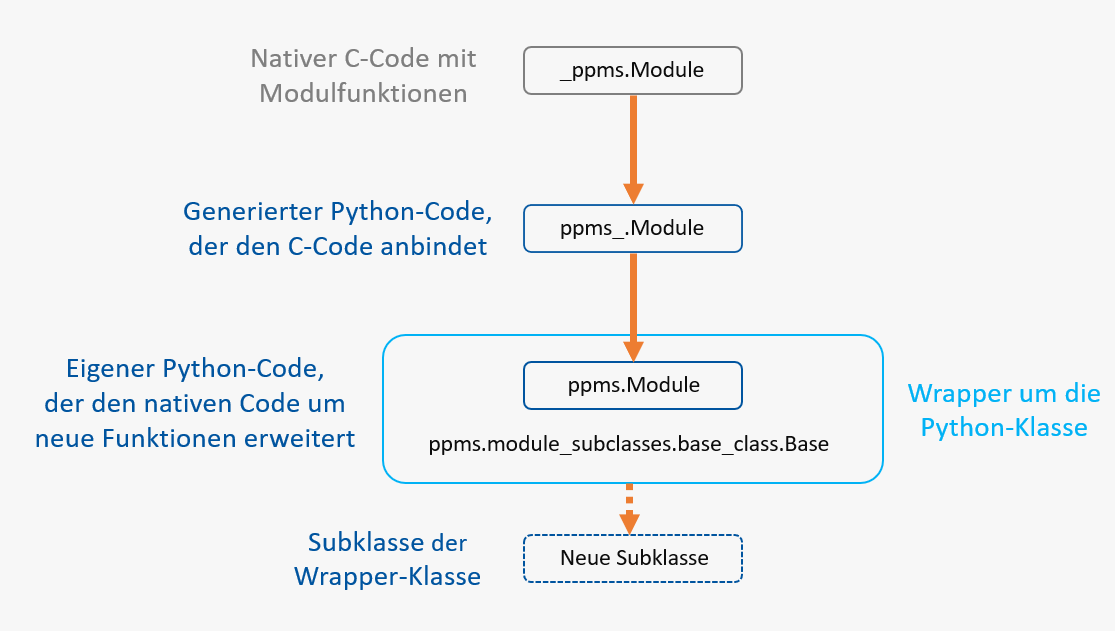
In order to understand what a subclass is, you should get an overview of how the Python linkage in PLANTA works:
How is the native C-Code turned into a Python class?
-
The native functions are linked in a special module (
ppms.i). -
These functions are compiled with the
SWIG
tool.
-
A kind of
.dll/.sofile named_ppms.pydis created which provides the respective functions. -
A Python file named
ppms_.pyis created, which provides the complete functions from the_ppms.pydlibrary.
-
-
In the Python directory there is the
ppms.pyPython file which is imported fromppms_.pyand extends the code by further functions written in Python. -
If you now use an API function which returns a
moduleinstance, this module instance will not be returned directly, instead you receive a module subclass: either the class specified in the record from DT405, or theBasestandard class.
Practice
Information
-
Every new module has the
ppms.module_subclasses.base_class.Basemodule class by default. -
All module subclasses are to inherit from this class.
Note
-
As is the case for all other swapped-out Python files, the client must be restarted after changes have been made.
Module Subclasses and Macros
PLANTA advises you against using macros. Instead, module subclasses should be used, which have the following advantages over macros:
-
Can be edited with an IDE (Pycharm, PyDev, Visual Studio, ...)
-
Enhanced searchability
-
Can easily be exchanged (enables central adjustments)
-
Functions can be used again
-
Functions can easily be adjusted in particular modules
-
Can be versionized in a source code management system (traceability of adjustments)
Information
-
If a module has a macro and a module subclass, it behaves as follows:
-
The module macro will be run after the module has been opened. The code at the top level is executed.
-
If the same function exists in both macro and module subclass (e.g.
on_load()), only the function of the module subclass is opened. -
If a function only exists on one side, it will be opened.
-
Open Methods
Procedure
-
To render a method of the module subclass callable, e.g., via a button, proceed as follows:
-
Implement the method in the module subclass
-
The method signature must look like this:
(self, applied_dfc, clicked_df)
-
-
Insert a new button DI (004336) in a data area with:
-
DF behavior: *5 (c5, e5, f5, g5, m5)
-
Action ID: Name of the method
-
-
Overwrite Menu Items
Procedure
-
To overwrite a menu item, proceed as follows:
-
Overwrite the
menu_override(self, menu_id)method in its module subclass -
With
ifyou can check whether the menu item to be overwritten is currently running. -
Treat the menu item and use one of the following two return values:
-
self.MENU_OVERRIDE_SUCCESS: The menu item has been treated successfully. -
self.MENU_OVERRIDE_FAILURE: The menu item has not been treated successfully.
-
-
Finally, open the
super()function to ensure a regular program flow for other menu items.
-
Example
from ppms import ppms
from ppms.module_subclasses.base_class import Base
from ppms.constants import MENU_FILTER, MENU_RESET, MENU_SAVE

class ModuleThatOverwritesSave(Base):
    def menu_override(self, menu_id):
        if menu_id == MENU_SAVE:
            ppms.ui_message_box('No saving allowed!')
            return self.MENU_OVERRIDE_SUCCESS

        # Don't allow resetting as that brings up a save prompt
        elif menu_id == MENU_RESET:
            return self.MENU_OVERRIDE_SUCCESS

        return super(ModuleThatOverwritesSave, self).menu_override(menu_id)