
HQL
General
Information
-
HQL (Hibernate Query Language) is a query language with which classes and objects can be addressed directly without knowing their names in the database (e.g. "project.pr_id" instead of "DI001001 FROM DT461").
-
Queries are translated in SQL statements and run internally.
-
HQL names can be read from the Data Dictionary, entity names (for tables), or DI Python IDs (for columns).
Notes
-
Via HQL, only SQL queries are transmitted directly to the database. Further PLANTA Project functionalities like, e.g., dependent saving or deletion is therefore not possible.
-
If, e.g., a project is deleted via HQL, the subordinate project structures are not deleted automatically as well.
-
At the moment, PLANTA project generally uses Hibernate version 4.3.4 with the contained functionalities including HQL: http://hibernate.org/orm/documentation/4.3.
HQL Module
Information
-
In order to be able to use HQL, the hql module must be imported first.
Example (classic)
from hql import hql
or (preferred)
import hql
Methods
Information
-
There are three functions available for HQL.
search_record
Details
-
This method returns a list of DTP records
hql.search_record(String hql, Dictionary parameters)
Example
pars = { 'pr_id' : '4811' }
project = hql.search_record("from Project project where project.pr_id = :pr_id", pars)
query
Details
-
This method returns a list of data (in list form) according to
db_select().
hql.query(String hql, Dictionary parameters)
Example
pars = { 'pr_id' : '4811' }
project_data = hql.query("select project.pr_id, project.project_name from Project project where project.pr_id = :pr_id", pars)
modify
Details
-
With this method you can carry out update or delete statements. The number of changes made to the DB is returned, according to
db_modify().
hql.modify(String hql, Dictionary parameters)
Example for update:
pars = { 'pr_id' : '4811', 'pr_name' : 'new_name' }
hqlString="update Project project set project.project_name = :pr_name where project.pr_id = :pr_id"
hql.modify(hqlString, pars)
Example for delete:
pars = { 'mod_id' : module.id.get_value() }
hql.modify("delete Module m where m.id_ = :mod_id", pars)
Notes
-
In HQL, properties are only identified via Python IDs.
-
Names like "id","class", "enum", "const" are reserved for Hibernate and Java. All Python IDs that use these names can be accessed in HQL with Python ID and underscore, e.g. ("id_").
-
Instead of table names, the names of entities are used.
HQL Documentation
Information
-
In HQL, the entity name is used instead of the table name, and instead of the column name, the property name is used.
-
You can look up the entity name in the Data Dictionary (Entity name field). If it is not entered, the entity name is DTxxx.
-
Currently, the entities in PLANTA project are not yet linked via associations. This means that joints cannot be used between them.
-
-
The property name is the same as that of the DI Python ID. If it is not entered, the property name is "DIxxxxx".
-
Parameters are optional dictionaries that are used to hand over parameters of the HQL statement. For further information, see Bind Variables in Statements.
Example
pars = { 'pr_id' : '4811' }
project = hql.search_record("from Project p where p.pr_id = :pr_id", pars)
-
In HQL, UUIDs are to be handed over as strings
Example
import hql
from ppms import ppms

project_record = ppms.search_record(461, ['4811'], ['uuid'])
uuid = project_record.uuid.get_value()

pars = { 'pr_uuid' : uuid }

query = "SELECT project.project_name from Project project where project.id = :pr_uuid"
result = hql.query(query, pars)

ppms.ui_message_box(result) # [['Schleppkettenanlage']]
Note
-
For further information, refer to the official HQL documentation.
Advantages of hql.search_record and ppms.search_record
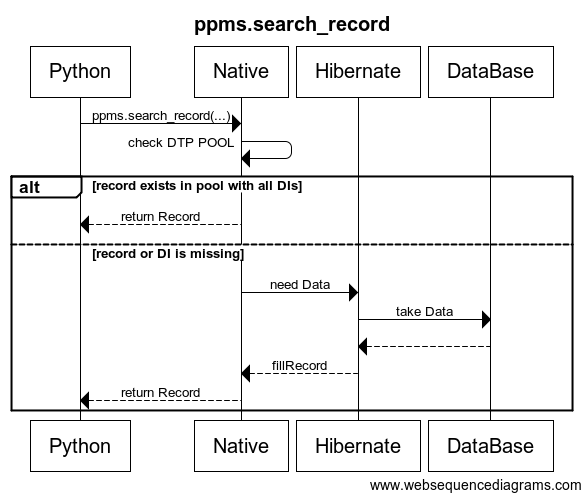
ppms.search_record()
-
Only leads to the database if the record does not exist entirely.
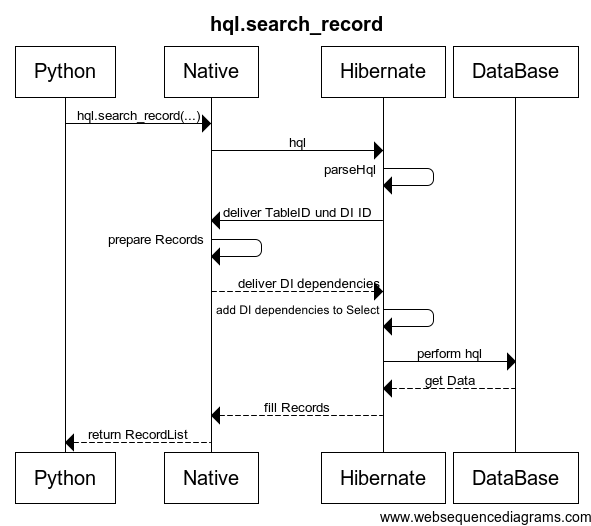
hql.search_record()
-
Search on more than one record.
-
Search is not restricted to the primary key but can do everything that is also possible in an HQL where-clause.