General
The results of scheduling include:
-
earliest start -/ end dates , latest start -/ end dates and calculated start -/ end dates on project level
-
earliest start -/ end dates , latest start -/ end dates and calculated start -/ end dates on task level
-
and, if resources are already planned, calculated start / end dates of the assigned resources as well as their loading and capacity adjustment.
Calculation of Start Dates
Information
-
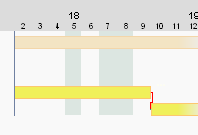
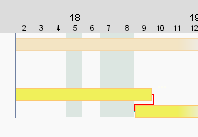
The network theory and the practical approach are available for determining the start of a task successor.
|
Network plan theoretical approach
|
Practical approach
|
-
in PLANTA project
-
tasks with duration > 0 and EA relation are planned according to the practical approach, i.e. The successor starts on the following working day
-
tasks with duration = 0 (e.g. milestones) and EA relation are planned in the following way:
-
If the duration of a task = 0, you can define via the Successor task start +1 day model parameter when its successor is supposed to start.
-
If the successor of a task has a duration of = 0, the successor always starts on the same day as the task itself.
-
-
Details
-
Requested and actual dates on non-working days (vacation, absence) remain valid and are taken into account during the calculation of the calculated dates. Start and end dates can thus also be scheduled on non-working days. However, the duration of a task is displayed in working days regardless. The resources are only loaded on working days.
Example
-
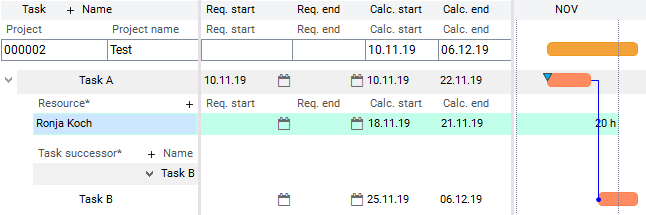
The TA Requested start of task A falls on Sunday, 11/10/2019, a non-working day. The start of task A is scheduled for the Requested start date.
-
Task B has no requested date, it therefore starts on the next working day.
-
Resource Ronja Koch is on vacation from 11/11/2019 to 11/15/2019. It is not planned within the vacation period.