
Information
-
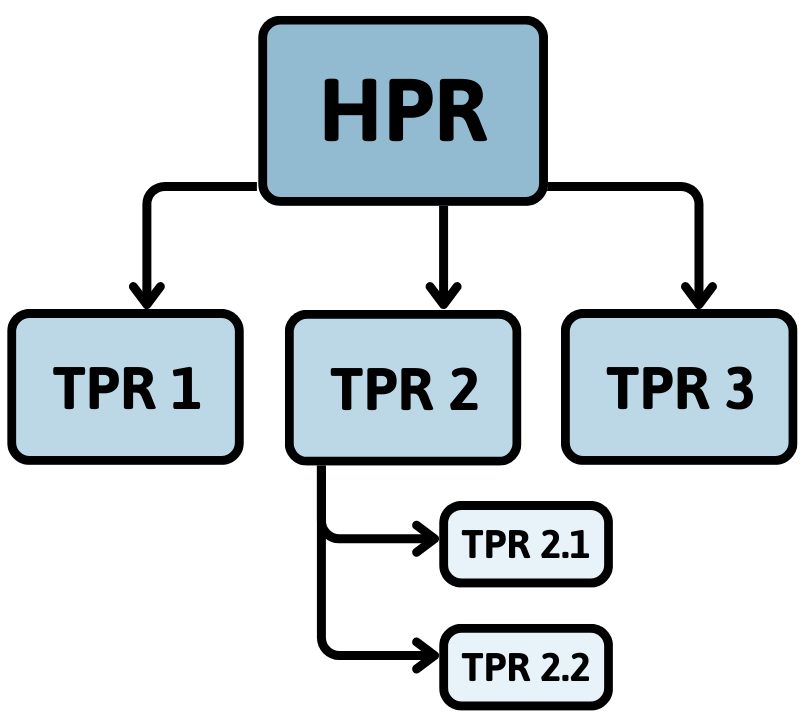
You can structure projects by splitting them into main and subprojects. The structuring described here is not to be confused with Structure Tasks which refer to the hierarchical order of tasks (project steps) within a project.
-
In a project structure, there can only be one main project and one or more subprojects. The main project is a project at the highest structural level. Subprojects can contain further subprojects (i.e. they can be sub and superordinate at the same time), depending on how deep the structure goes.
-
In the following schema, which depicts a model project structure, it is explained how the terms main and subproject, parent and child project correlate.
|
Structure example |
Explanation |
|---|---|
|
|
Where can I structure projects?
In the Subprojects module of the required project
The project structure will be displayed additionally in the Structure Information module, however, there will be no editing options.
Procedure
Open the project by
-
opening a dialog window via the Extras → Go to menu or via CTRL+G and entering the ID of the required project or
-
by clicking on the link on the ID of the required project in any module.
Who is allowed to structure projects?
All users who have access to the Subprojects module and have modification rights for projects.
These are, in PLANTA standard, managers of the respective project, their deputies, or multi-project managers. For further information on rights, please click here.
Assign a New Project to an Existing Project as a Subproject
Procedure
-
Click on the Create subproject button in the Subprojects module in the box of the project to which you want to subordinate a project, or right-click and select the command of the same name from the context menu.
-
The What do you want to do? dialog message is displayed. Click on the Create new subproject button.
-
A new project is created and subordinated to the required project at the same time.
-
The ID of the subproject will be generated automatically.
-
-
Click on the

- Verhalten der Terminrechnung bei Projektstrukturen
- Verhalten der Terminrechnung bei Projektstrukturen
- Behavior of Scheduling in Project Structures
- Verhalten der Terminrechnung bei Projektstrukturen
- Verhalten der Terminrechnung bei Projektstrukturen
- Behavior of Scheduling in Project Structures
- Behavior of Scheduling in Project Structures
- Behavior of Scheduling in Project Structures
- Behavior of Scheduling in Project Structures
- Verhalten der Terminrechnung bei Projektstrukturen
- Verhalten der Terminrechnung bei Projektstrukturen
- Verhalten der Terminrechnung bei Projektstrukturen
- Verhalten der Terminrechnung bei Projektstrukturen
- Behavior of Scheduling in Project Structures
- Verhalten der Terminrechnung bei Projektstrukturen
- Behavior of Scheduling in Project Structures
- Behavior of Scheduling in Project Structures
- Behavior of Scheduling in Project Structures
- Verhalten der Terminrechnung bei Projektstrukturen