
Information
-
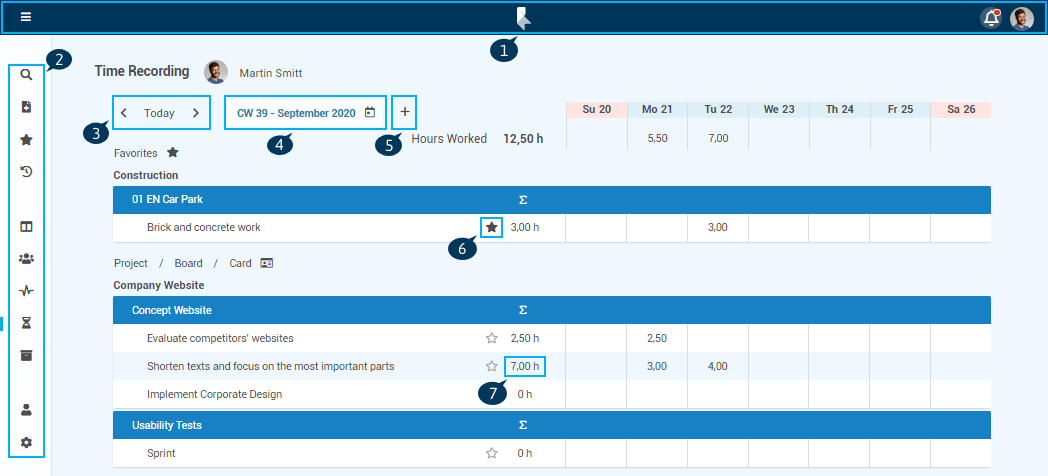
In the Time Recording panel
-
hours worked recorded by the PLANTA pulse user are displayed and
-
new hours worked can be recorded on cards and recorded hours worked can be edited.
-
-
By default, the time recording for the current calendar week is displayed.
Access path
-
Menu → Time Recording
-
Pressing the Z key.
Details
-
The following cards are displayed:
-
Cards to which the user is assigned and which fulfill one of the following criteria:
-
Start date within the current week
-
Due date within the current week
-
Date area overlaps the current week (start before the current week and due after the current week)
-
Start date in the past and no due date
-
-
Cards on which the user has already recorded hours worked
-
Hours worked which have been recorded in the Time Recording tab in the detail view of a card are therefore displayed in this panel as well.
-
-
-
The cards are sorted as follows:
-
Favorites
-
This area contains cards with their boards and projects which have been added as time recording favorites (favorites star activated).
-
-
Project / Board / Card
-
This area contains PLANTA pulse cards in which the currently logged-in user is planned.
-
-
Calendar View
-
If From/To Time is activated in the Administration panel, a calendar view can be opened via the button.
-
Here, the working times of the current calendar week are displayed.
-
If needed, the entries can be moved or made bigger/smaller.
-
New entries can be added via the .
-
Notes
-
Hours worked recorded in this panel are also displayed in the detail view of the card in the Time Recording tab.
-
Hours worked can only be recorded on cards and not on boards or projects.
-
Cards on which hours worked have been recorded cannot be deleted anymore but only archived.
Example desktop view
Example mobile view
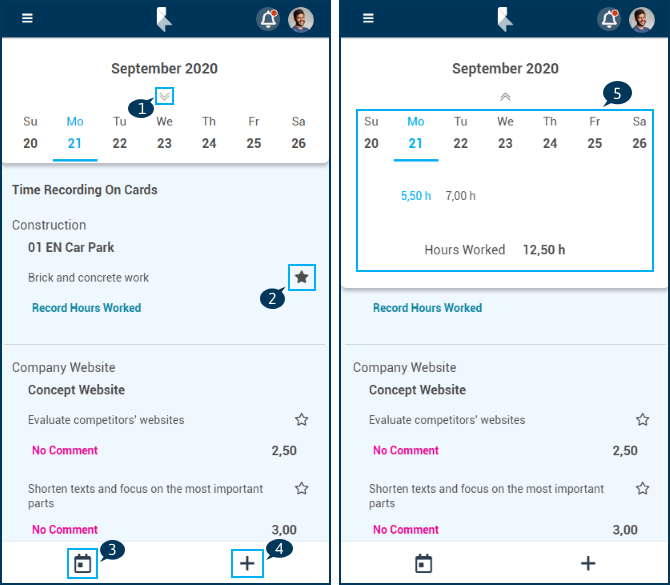
Details
-
Button to open the weekly overview (1) (see also 5)
-
Card which has been added as time recording favorite (2)
-
Week selection (3)
-
Record hours worked on further cards (4)
-
Weekly overview with the recorded hours worked of the selected week (5)