
Information
-
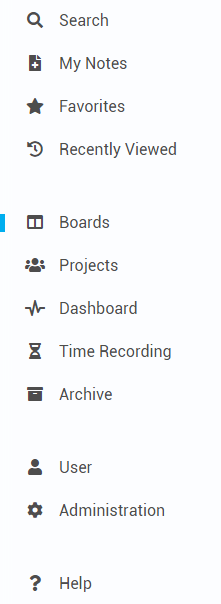
In PLANTA pulse, the Program Menu, hereafter called menu, is always displayed on the left.
-
It is not to be confused with the User Menu, which can be found in the upper right.
-
-
The menu can be home bar expanded via in the home bar to view the descriptions of the menu items.
-
It is divided into three sections and contains 12 or 11 menu items.
-
The 11th menu item leads to the Administration panel and is only displayed for global admins.
-
-
When the mouse is moved over the menu items, tooltips with information on the items appear.
|
Default |
Expanded |
|---|---|

|
|
Search
Menu → Search
Information
-
Via the menu item Search, you can search for boards, projects or cards.
-
The following elements are searched:
-
Custom fields (Text, display text of links)
-
The search can be opened out of all areas of PLANTA pulse and opens in a separate window.
-
Via the button, further search options can be configured to filter the results.
More information on search options
My Notes
Menu → My Notes
Information
-
Via the menu item My Notes, users can create notes in PLANTA pulse.
-
They can be used to collect ideas quickly, which can then later be converted into boards or cards.
-
The option can be opened out of all areas of PLANTA pulse via the menu or the N key and opens in a separate window.
Favorites
Menu → Favorites
Information
-
Via the menu item Favorites, boards which have been added as favorite can be accessed.
-
When clicking the menu item, the menu opens and the boards are displayed.
-
By clicking on the icon on a board, the board can be removed from the favorites again.
Recently Viewed
Menu → Recently Viewed
Information
-
Via the menu item Recently Viewed, recently viewed cards and boards can be accessed.
-
When clicking the menu item, the menu opens and the last viewed cards and boards are displayed.
-
In the upper area, the 4 last opened cards and in the lower area, the 4 last opened boards are listed.
More information on the Recently Viewed area
Boards
Menu → Boards
Information
-
Via the Boards menu item, the Boards panel can be accessed.
-
Here, a user sees an overview of all boards on which/he she is a member and all public boards which he/she could join.
Projects
Menu → Projects
Information
-
Via the Projects menu item, the Projects panel can be accessed.
-
Here, users can view projects to which they have been assigned.
-
Global admins can create new projects.
Dashboard
Menu → Dashboard
Information
-
Via the Dashboard menu item, the Dashboard panel can be accessed.
-
Here, the user can manage his/her tasks by using search and filter widgets.
Time Recording
Menu → Time Recording
Information
-
Via the Time Recording menu item, the Time Recording panel can be accessed.
-
Here, a user can view an overview of all recorded hours worked.
-
New hours worked can also be recorded and recorded hours can be edited.
Archive
Menu → Archive
Information
-
Via the Archive menu item, archived projects can be viewed and restored, if needed.
Details
-
All projects of which the currently logged-in user was a member are listed.
-
Global admins can view all archived projects.
-
-
Project admins can restore or delete projects by clicking or respectively.
-
A tab area is displayed per project:
-
Infos: contains information regarding the project and its members
-
Boards: contains a table with the boards of the project
-
By clicking or , the boards can be viewed or deleted.
-
-
Board Templates: contains a table with the board templates of the project
-
By clicking or , the board templates can be viewed or deleted.
-
-
User
Menu → User
Information
-
Via the User menu item, the User Settings can be accessed.
-
Here, users can configure their personal settings for PLANTA pulse.
Administration
Menu → Administration
Information
-
Via the Administration menu item, the Administration panel can be accessed.
-
Here, global admins can configure the general settings in PLANTA pulse.
-
Users without global admin rights cannot see this menu item.
Help
Menu → Help
Information
-
Via this menu item or via the ? keyboard shortcut, the help for PLANTA pulse can be opened.
-
If the help is accessed via the ? keyboard shortcut the Keyboard Shortcuts tab is focused by default.
-
-
The help opens in a separate window and can be opened out of all areas of PLANTA pulse.
Details
-
In the upper area, links to the documentation of PLANTA pulse are displayed.
-
The lower area contains the three tabs Getting Started, Keyboard Shortcuts and News.
Getting Started Tab
Menu → Help → Getting Started tab
Information
-
In this tab, interactive tutorials are displayed which the user can play through to get to know PLANTA pulse better.
-
Furthermore, a demo project with a Welcome Board can be created.
Keyboard Shortcuts Tab
Menu → Help → Keyboard Shortcuts tab
Information
-
In this tab, the possible keyboard shortcuts in PLANTA pulse can be viewed.
-
If the help is accessed via the ? keyboard shortcut the Keyboard Shortcuts tab is focused by default.
Release Notes Tab
Menu → Help → Release Notes tab
Information
-
In the Release Notes tab, information on changes in PLANTA pulse since Release 31 are displayed.
News Tab
Menu → Help → News tab
Information
-
In the News tab, information by PLANTA regarding for example new releases or events is displayed.