
For information
-
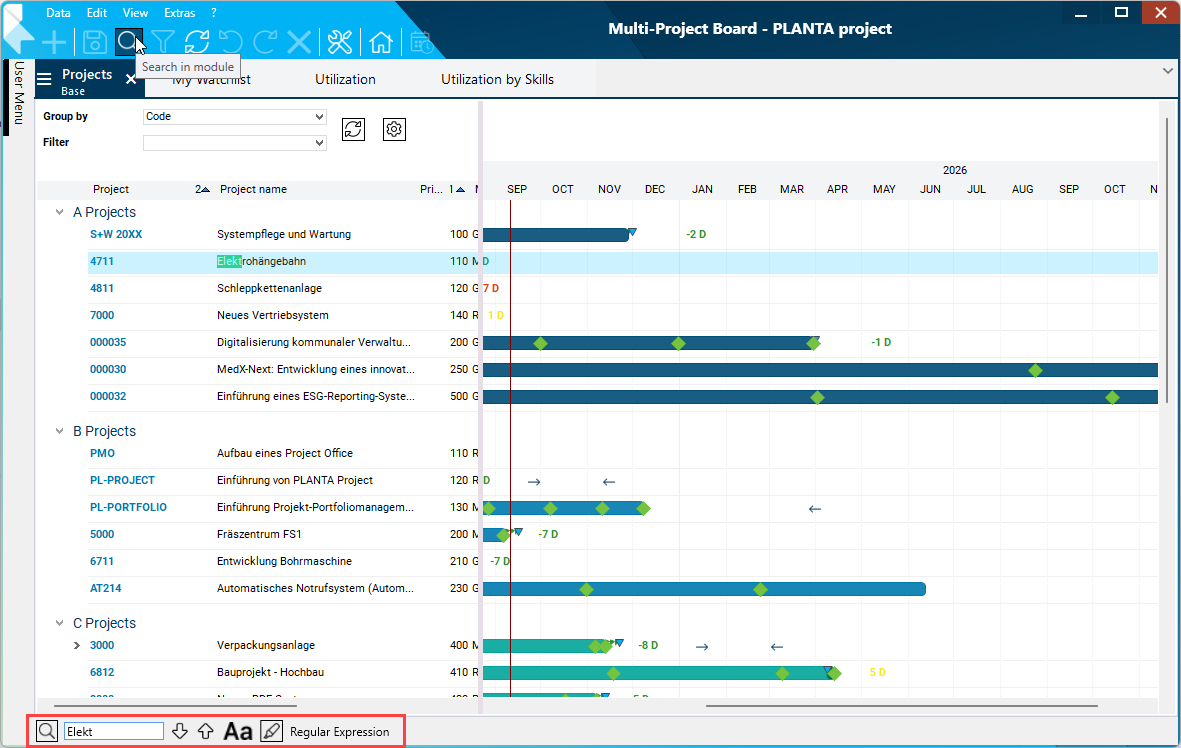
There is an option to search for the occurrence of a particular character string in the data of a selected/opened module. The data display will remain unchanged at first, the searched character string will be highlighted. This option will be described in this topic.
-
Another option is to restrict the data displayed in the module in line with particular specifications. The process is called filtering and is described here.
Procedure
-
Activate the module in which you want to perform the search.
-
Have the search bar displayed at the bottom of the screen via:
-
Data → Search in module or
-
via the CTRL + F key combination.
-
-
enter the required search string in Search:
-
It will automatically be scrolled to the first character string which coincides with the search value and the string will be highlighted in green.
-
If you cannot see the match, it may be in the hidden part of a data field (the field is too short).
-
-
-
You can navigate to further matches:
Details
-
The search bar is module-related, i.e. if another module is activated, it will not be visible in the newly opened module. If the module to which the search bar belongs is reactivated, it is displayed again.
-
If you click into the corresponding module, you can focus the Search field by pressing CTRL + the F key.
-
If there is an entry in the input field, it will be marked.
-
-
If the Search field is focused, you can close the search bar by pressing the ESC key.
-
Other functions:
-
Case sensitivity button (ALT + G)
-
Defines whether case sensitivity is to be considered.
-
-
Highlight button (ALT + H)
-
Defines whether all hits are to be highlighted in yellow.
-
-
Use regular expressions button (ALT + R)
-
Defines that the search term is analyzed as regular expression.
-
-
Notes
-
Every time you enter a new character in the search string, the entire string will be searched.
-
As soon as no more matches are found for the current string, the search field will be colored red, telling you that any further input of characters will be pointless.
-
Text on buttons is excluded from the search.