
Access
-
PLANTA link role → Interface Configuration → Configuration and Execution panel → Configuration
-
PLANTA link role → Interface Configuration → Configuration and Execution panel → Execution → Configure context menu entry → Configuration
Information
-
In this module, the most important data and parameters of an interface are created and maintained.
-
Depending on the access rights of the current user, he/she can modify the data.
Create New Interface Configuration
Define a configuration manually
-
Click on the Insert button.
-
The UUID field is automatically filled.
-
Enter a name for the configuration in the Name field.
-
Fill the Source module and Target module mandatory data fields.
-
Define
further configuration
parameters or change already preset ones as desired.
-
Save.
Details
-
Every newly created configuration can be marked as a template for the creation of further interface configurations by activating the Template checkbox.
Copy from template
-
Click on the Copy template button.
-
The Interface Templates dialog module which contains a list of all interface configurations that can be used as templates is opened.
-
Click on the link on the name of the required template.
-
A new configuration is created the name of which is composed as follows: [Source configuration name + "Copy" string]
-
-
Copy existing configuration
-
Click on the Insert button.
-
Select the required configuration from the listbox.
-
Right-click → Select Copy configuration.
-
A new configuration is created the name of which is composed as follows: [Source configuration name + "Copy" string]
-
Locked configurations cannot be used as a copy source. If you try to copy such a configuration, the following message is displayed: It is not possible to copy: The configuration is locked.
-
Edit Interface Configuration
Procedure
-
Click on the Insert button.
-
Select the required configuration from the listbox.
-
Make the required changes and save.
Context Menu
-
Via the context menu in the configuration header you can carry out the following actions:
-
Execute: Opens the configuration in the Execution module.
-
Edit source module: Opens the module specified in the Source module field in the Modules module
-
Edit pool module: Opens the module specified in the Pool module field in the Modules module
-
Edit target module: Opens the module specified in the Target module field in the Modules module
-
Go to source configuration: If the current configuration is a copy, the corresponding source configuration is opened. Otherwise, the This configuration is a copy message will be displayed.
-
Edit Configuration Parameters
Procedure
-
Click on the Edit parameters button in the header area of the configuration.
-
The Interface Parameters module is opened and displays the parameters available for source, pool, and target modules.
-
Which parameters are available depends on the module subclasses of the source, pool, and target module.
-
For a detailed documentation of the parameters, see the Interface Library | id (39.5.18 en)InterfaceLibrary ModulParameter topic.
-
-
Edit the required parameters.
-
Save.
Mappings
Information
-
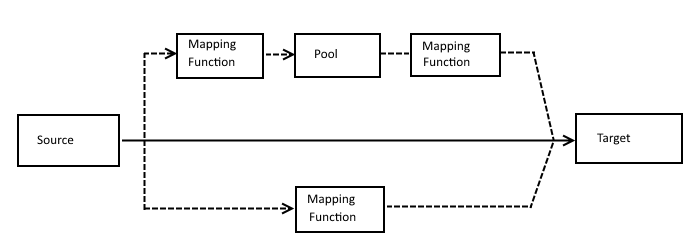
A mapping is the centerpiece of any configuration.
-
A mapping specifies which columns in the source correspond to which columns in the target.
-
Furthermore, a mapping allows to check, convert, and adapt values before they are sent to the target module.
Notes
-
A mapping always leads from a source to a target.
-
Between source and target, various mapping functions can be interposed.
Mapping Element Types
-
Source: Source column
-
Pool: Pool column
-
Target: Target column
Mapping Functions
Mapping Structure
Create Mapping
Procedure
-
In order to generate the mapping automatically, click on the Generate mapping button in the header area of the configuration.
-
The Generate mapping module is opened.
-
Here, select the required mapping type from the listbox and click on the Generate button.
-
The mapping elements are inserted automatically on the basis of the objects (columns/fields) defined in the source or target module.
-
Note
-
Alternatively, the mapping elements can be inserted on the same level via right-click or via the Insert button. This may be necessary, e.g., when the mapping function is interposed.
-
By clicking on the Insert child mapping button, individual mapping elements can be created below the respective mapping element.
Edit Mapping Parameters
Procedure
-
Click on the Edit parameters button on the required mapping element.
-
The Mapping Parameters module is opened in which mapping parameters can be compared.
-
For information on the effect of the parameters, please refer to the Interface Library topic.
Note
-
Parameters can also use the result of another mapping column as a value. For this purpose @<target mapping name> must be entered as a value.
Validate Configuration
Information
-
The validation of the configuration automatically takes place before every transfer, i.e., at the beginning of the transaction. However, it can be started manually as well.
Procedure
-
Select the configuration to be checked.
-
Click on the Validate configuration button.
-
The validation is carried out and the result is subsequently written in the log of the configuration. You can view the results in detail in the Logging module or in the log file, depending on the log type set for the configuration.
-
If mappings have been recognized as incorrect, they are marked in the module.
-
Validity Check
-
The mapping is checked for the following requirements:
-
No source mapping may have a parent mapping.
-
No target mapping must have a child mapping.
-
Each source mapping must lead to at least one pool or target mapping.
-
Each target mapping must stem from a source mapping.
-
All mapping functions must be integrated correctly in a chain from source to target.
-
The Object field must be set for all mappings except for the source mappings.
-
All relative parameters must refer to an existing target mapping.
-
All mapping functions must be findable.
-
All mapping objects need a valid type.
-
-
Further validity checks:
-
The pool table must possess the status, transferred_on, and UUID fields.
-
The source module must implement the
sendmethod. -
The source module must implement the
receivemethod. -
The pool module must implement both methods.
-
No pool mapping without pool module or pool table and vice versa.
-
All validators with child_when_invalid parameter refer to an invalid child mapping.
-