
About This Page
This page explains how to plan, record, and calculate costs in PLANTA Project—from initial planning through to the ongoing project. It primarily addresses project managers.
What is effort?
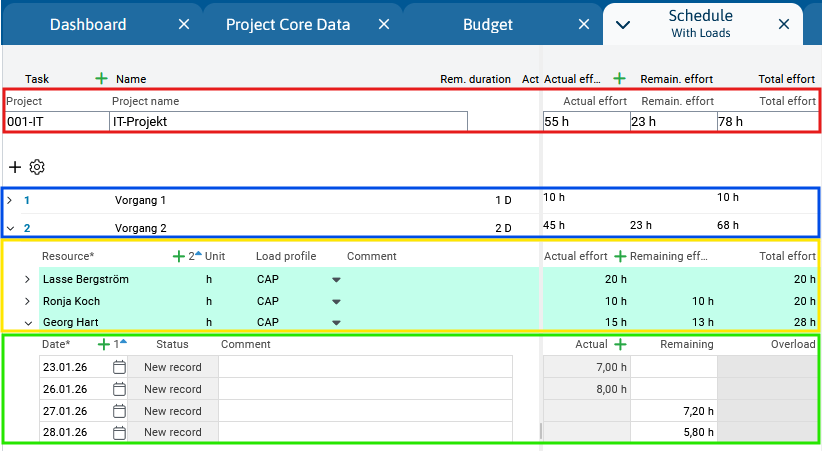
Effort means time or monetary constraints for completing a project or task. PLANTA distinguishes between three types of values:
-
Remaining – remaining, planned effort
-
Actual – work already completed
-
Total – sum of remaining and actual
In the Schedule module, work is planned for each assigned resource on the respective task and automatically distributed across individual days (or other time periods).
Effort at Different Project Levels
Effort is summarized along the following project structure - from lowest level upwards:
|
Level |
Code |
Meaning |
|---|---|---|
|
Project level |
PR |
Total effort of the project, aggregated from all tasks. |
|
Task level |
TA |
Sum of the effort of all resources of a task. |
|
Resource assignment level |
TAR |
Effort of a resource for a particular task Here, manual input is necessary. |
|
Load level |
LOAD |
Effort of a resource per day. Hidden by default – can be activated via the With Load module variant. |
Effort Planning: Step by Step
1) Plan Effort
If resources are assigned to tasks, the project manager enters the planned effort at the resource assignment level (VGR):
-
Person, Skill, and Department Resources → Remaining effort field in hours
-
Cost and Revenue Resources → Remaining costs in euros
2) Calculate schedule
After entering the effort, update the schedule by clicking on the 
-
CAP Load Profile The daily workload is limited to the amount that the resource can handle based on its availability and existing schedule.
-
No Load Profile: The workload is distributed evenly across all days of the planned work period.
-
MAN Load Profile Remaining values are entered directly at load level. For further information, please click here.
3) Effort in the Ongoing Project
Once the project has started, employees record their hours worked in the time recording modules. These are automatically reported as Actual effort on the resource assignment, the task, and the project. As a result, the Remaining effort is automatically reduced.
If the Remaining effort is adjusted manually (e.g., due to additional work), the originally planned value can be tracked via the Baseline status report. For further information on the manual adjustment of the remaining value, see here.
Overview: Comparison of Effort Types
The following table shows the behavior of the three cost categories—during initial planning and throughout the project.
|
Effort type |
Description |
Project is being planned (Actual start not yet set) |
Project started (Actual start set) |
Parameter |
|---|---|---|---|---|
|
Remaining |
Remaining work as of the date of this report. |
Manual input on TAR level. Automatic summarization at TA and PR. Automatic distribution on days (LOAD) according to load profile. |
Automatic = initial remaining minus actual value. Or manual adjustment at TAR level. For further information, please click here. |
|
|
Actual |
Expenses already incurred as of the reporting date. |
0 |
Data collection via time-tracking modules at the LOAD level. Automatic summarization to TAR → TA → PR |
|
|
Total |
Sum of remaining and actual |
Automatic calculation after each input or change to the remaining or actual amount. |
Automatic calculation after each input or change to the remaining or actual amount. |