
Information
-
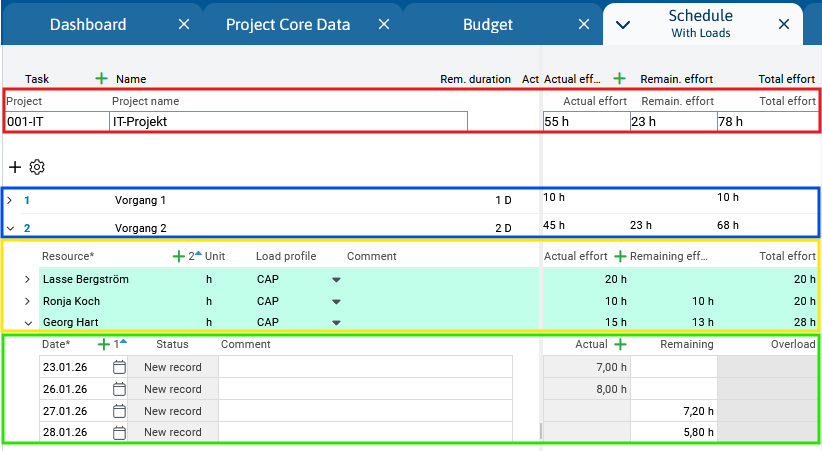
In PLANTA Project, effort is shown on a total of four different levels and is only entered on the two lowest levels (resource assignment level and load level).
-
Project level (PR) - here the effort that is still required to conclude the entire project is shown. Remaining effort is determined by summing up the Remaining effort of all resources assigned to the project.
-
Task level (TA) - here, the effort that is still required to complete the task is shown. Remaining effort is determined by summing up the Remaining effort of all resources assigned to the task.
-
Resource assignment level (TAR) - here, the effort of a resource for a certain task to which it has been assigned is entered/displayed in the Remaining effort field.
-
Load level (LOAD) - here, the effort of the resource for the individual days is entered/displayed in the Remaining load field (for MAN load profile).
-
-
-
To display all project levels as shown in the figure above, select the With Load module variant in the Schedule module, as the Basic module variant is displayed by default.
Details on effort distribution
-
If a project is divided into work packages, i.e. tasks, and the resources are assigned to individual tasks, resource or project managers enter the planned effort in the corresponding field by default:
-
The planned effort for person, skill, and department resources is entered as time units ("hours" in the standard system) in the Remaining effort field.
-
The planned effort for cost and department resources is entered as time units ("Euro" in the standard system) in the Remaining effort field.
-
Resources with MAN load profile.
In such cases, the remaining load value must be entered manually for this resource in the Remaining load field (Schedule in the With Load variant) for each load record instead of entering it for the entire task on resource assignment level.
Details
-
Below you will find a brief tabular overview of the effort parameters for different project levels:
-
This overview also provides a description of the behavior in both initial planning and calculation of already running projects.
-
For a detailed description of the individual parameters, please use the links in the last column.
-
|
|
Description |
Project is being planned (Actual start not yet set) |
Project started (Actual start set) |
Parameter |
|---|---|---|---|---|
|
Remaining |
Remaining vlaue, i.e., the remaining effort or the remaining costs of a project (proposal). This is the effort or the costs that are still required to complete the project. |
Manual input in the resource assignment and subsequently
Exception: When you use the MAN load profile, the remaining values are entered at load level and are then summarized to resource assignment → task → project. |
Manual input or changes are only possible at resource assignment level. |
Remaining effort (PR)
|
|
Actual |
Actual value, i.e. the actual workload or costs incurred in a project (proposal), i.e. the workload or costs that have already incurred for the completion of the project and posted to the project up to the time of assessment. |
0 |
|
Actual effort (PR)
|
|
Total |
Sum value of Actual and Remaining values, i.e. the entire effort or costs of a project (proposal). |
Automatic calculation on the respective level as soon as you have entered or changed Actual or Remaining and clicked outside the field. |
Automatic calculation on the respective level as soon as you have entered or changed Actual or Remaining and clicked outside the field. |
Total effort (PR)
|