
Objectives
-
Limitability of the memory used by the PLANTA Server
-
Treatment of memory bottlenecks
-
Maintenance of operation also in the case of scarce system resources
Configuration
-
In the delivery condition, the storage restriction is switched off.
-
The storage limit parameters can be set via the respective environment variables in the manager container of the server.
-
Storage limit is activated by specifying a maximum storage size via the
maintain__mem_limit__max_sizeparameter.-
This size is to be selected depending on the system resources.
-
Here you have to take into account that the size of the Java Virtual Machine is not included and has to be pulled off from the system resources.
-
Furthermore, further resources which are not included either (approximately 1.5 GiB for 50 parallel sessions), are allocated in each active session.
-
PLANTA recommends, for example, to use
mem_limit.max_size=8192for a server with 16 GiB RAM, and "medium" for system dimensioning (i.e., a JMV configuration of 4096 MiB).
-
-
The specifications for required free storage for particular actions should only be adjusted after consulting PLANTA, since a change may have negative effects on the operation of the PLANTA Server.
Effects of Storage Shortage
Information
-
In the case of storage shortage, the following messages are possibly displayed:
Dialog message 1045 (The "[action name]" action will be aborted due to memory shortage.)
Dialog message 1046 (Your session is aborted due to insufficient memory.)
Python Exception(s) Memory limit exceeded!
-
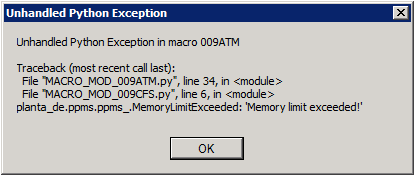
If storage shortage occurs in the Python context (e.g. from a macro), the following message will be displayed if the exception remains untreated:
Situations and Effects
For information
-
In the actions mentioned below, it is checked whether the estimated storage size is still available.
-
If this is not the case, the action will be canceled.
-
The user will be informed about the cancelation and the reason for it.
-
Each action cancelation has specific effects which will be explained below.
Start a New Session
-
The check will be carried out before the user logs in.
-
The 1045 message will be displayed.
-
After confirming via OK, the session is closed.
Load Module Data
-
The check is carried out each time the module data is loaded (e.g. filtering).
-
The 1045 message will be displayed.
-
If the loading of module data is initiated from the Python code, a Python exception will be displayed as well.
-
The loading of the module data (analogously to the cancelation of the module filter via ESC) will be canceled.
Calculate a Project
-
The check is carried out before the calculation of a project.
-
The 1045 message will be displayed.
-
A Python exception will be displayed if the Python code calculation has been opened.
-
The calculation will not be carried out.
Replanning
-
The check will be done before replanning is started.
-
Message 1045 will be displayed to the user.
-
A Python exception will be displayed if the Python code calculation has been opened.
-
The calculation will not be carried out.
Overrun of the Allocation Limit
-
The check is carried out for allocations.
-
The 1046 message will be displayed.
-
Depending on the action performed, there may also be Python exceptions.
-
The session will be quit after the message has been confirmed.