
Influence Factors
Information
-
In the calculation of a schedule, different parameters or factors, or their combination, have an impact on the results. The most important factors are:
- Links
-
Requested dates (Project, Task, Resource assignment)
-
Actual dates (Project, Task, Resource assignment)
- Factors which Influence Scheduling | id (39.5.20 en)FactorswhichInfluenceScheduling Calendar
-
Planning early task parameter
-
Fixing task parameter
-
Splitting task parameter
- Load Profiles and Load Distribution
-
Model Parameters
Dominance Rules within the Task Parameters
Information
-
In scheduling, the task parameters take effect in the following sequence: Each one mentioned overrides (dominates) all those mentioned afterwards:
-
TA actual dates (TA Actual start / TA Actual end)
-
TA requested dates (TA Requested start / TA Requested end) with Fixing parameter = 1
-
Links
-
TA requested dates (TA Requested start / TA Requested end) with Fixing parameter = 0
-
Planning early = N
-
Capacity Adjustment
-
|
Example |
Reason |
|---|---|
|
TA actual dates override set links |
In practice, things often turn out differently. A task starts later or earlier than planned. If this has occurred, the schedule change is to be considered in any further planning. |
|
TA requested dates override Planning early = N and capacity adjustment |
If requested dates are set, the task should also be loaded there if possible. Only links can prevent this. This also applies when the Fixing parameter = 0. If Fixing = 1, requested dates will even override links. |
Taking into Account of Different Calendars in Scheduling
Information
-
PLANTA project allows you to work with multiple calendars.
-
You can create calendars in the Calendar module.
-
They can be used for multiple purposes in PLANTA project.
Details
-
System calendar (up to DB 39 releases "company calendar")
-
If no other calendar is specified, the calendar defined as system calendar is used for scheduling by default. The calendar is stored in the System calendar (DT345) in the License, System Parameters, and DB Instances module for the entire system.
-
-
Project calendar
-
For projects, the calendar is defined in the Calendar parameter (DT461). The project calendar precedes the system calendar This parameter is not used in the Standard but can be integrated in the required modules in customized systems.
-
-
Task calendar
-
For links, the calendar will be entered in theTask calendar parameter (DT463) in the Schedule module. By using a task calendar you can, e.g. Make sure that resource loading for tasks in other countries does not start on a local holiday.
-
-
Link calendar
-
The link calendar is taken into consideration in the interval calculation for successor dates. For links, the calendar is entered in the Link calendar parameter (DT465) in the Schedule module.
-
-
Resource calendar
-
For resources, the calendar is entered in the Calendar parameter (DT467) in the Resource Data Sheet module
-
Caution
-
A calendar entry on the resource is necessarily required since it is used for the creation of resource periods.
-
If changes are made to the calendar afterwards, they do not have an effect on existing periods of the current resources but only on newly created periods. If you want changes to take effect on existing resource periods, you have to delete the periods of the respective resources which use the changed calendars and create them anew.
-
Since in PLANTA project some user modules access periods, some, on the other hand, directly access the calendar, this may result in different behavior in modules, if, e.g., the calendar assigned to resources has been changed after the creation of resource periods.
-
Calendar interaction
-
Project:
-
If no project calendar has been entered for the project, then the system calendar will be used as the project calendar.
-
-
Task:
-
If an own calendar is entered on the task, it takes effect regardless of whether other deviating calendars are entered on other objects (system, project, resource).
-
If no own task calendar is entered on the task, the project calendar takes effect. If no project calendar is defined for the project, the system calendar will take effect.
-
-
Resource assignment
-
On the resource assignment, the respective resource calendar always takes effect.
-
-
Links
-
If a link calendar is entered, it overrides all other calendars in the date determination of links except the task calendar of the successor. I.e. If the task successor has an own task calendar, this calendar will override the link calendar.
-
If no link calendar is entered, the task calender of the successor will precede if there is one.
-
If there is no task calendar, the resource calendar will take effect if the successor has a resource assignment,
-
If there is no resource assignment, the project calendar will take effect if there is one. If there is no project calendar, the system calendar will take effect.
-
-
-
Show example...
Example for the use of a link calendar
-
For the shipping of a turbine, 7 weekdays are estimated. You therefore enter a time interval of 7 days in the link. However, if no link calendar is used, the successor starts 7 working days later, not 7 calendar days. The task is therefore scheduled with a delay.
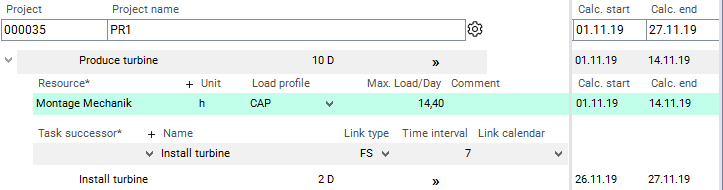
-
If you use a calendar without work-free days as a Link calendar, the task is scheduled as desired.
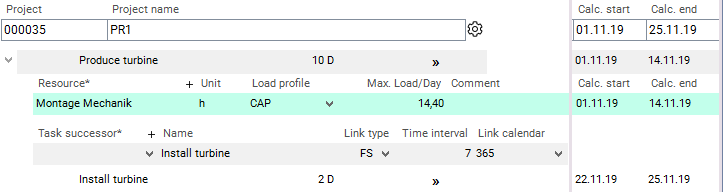
Effect of the calendars on dates and durations
-
Effect of the calendars on scheduled start and end dates
-
A task requested date on a non-working day is not shifted to the next working day.
-
If a TA Requested start or TA Requested end is on a non-working day, the dates calculated from it (e.g. TA Calc. start / TA Calc. end) moved to the next working day.
-
If a TA Actual start or TA Actual end is on a non-working day, the dates calculated from it (e.g. TA Calc. start / TA Calc. end) moved to the next working day.
-
If a day in the calendar is a non-working day, the task will be extended by the duration of the non-working time;
-
Resources are not scheduled on their non-working days.
-