
Requirements for the use of Adaptive Cards
The requirements you find in this chapter must be met in order to enable the use of Adaptive Cards in a PLANTA project system.
Adaptive Cards Function
The Adaptive Cards function in the Global Settings module must be activated.
Web Client
The Web Client must be installed and accessible via application server.
In order to be able to fill Adaptive Card templates with data, the PLANTA project system must communicate with a Web Client and transmit the data via web request. The Web Client then answers with the filled card.
-
Configure API Key. E.g. insert
“AuthenticationSettings__WebAPI__APIKey= string"under Environment in docker-compose.yml. -
Fill the global Web client URL and Web client API key settings accordingly. If the Webclient API URL is not filled correctly, the value from Webclient URL is used by default.
-
The Web Client must be accessible via HTTP.
Web Interfaces
The web interfaces must be accessible via Internet.
-
Since web-based communication is performed via the Microsoft exchange servers and the PLANTA project server, the web interfaces must also be accessible externally.
-
The authentication of the Adaptive Card end points must currently be set to API key. If necessary, the API key can be allocated individually before use.
Avatar End Point
In order to be able to retrieve the avatars of the resources, you have to create a valid token for the avatar web interface.
Outlook
Outlook environment must be configured.
-
Actionable messages must be enabled in the Outlook environment by an administrator so that Adaptive Cards can be sent between different e-mail accounts: https://outlook.office.com/connectors/oam/publish.
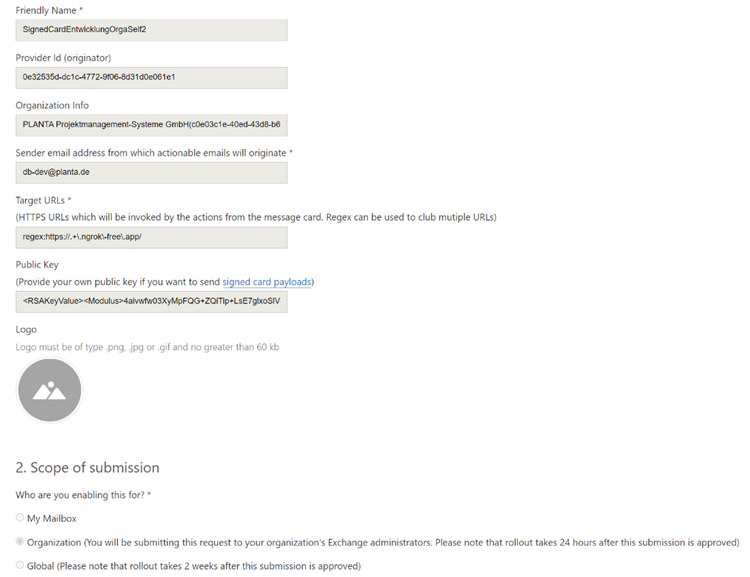
Configuration example:
-
The “Sender email address” must correspond to the e-mail used by the PLANTA project system. This e-mail address is defined in the global System e-mail address (default_email_sender) setting.
-
The "target URLs" must correspond to the address under which the web interfaces are opened.
-
The “Provider Id” must be stored in the global Actionable Message Provider Id (originator) (actionable_message_provider_id) setting in the PLANTA project system, otherwise the cards will not be displayed.
See also: Adaptive Card Customizer