
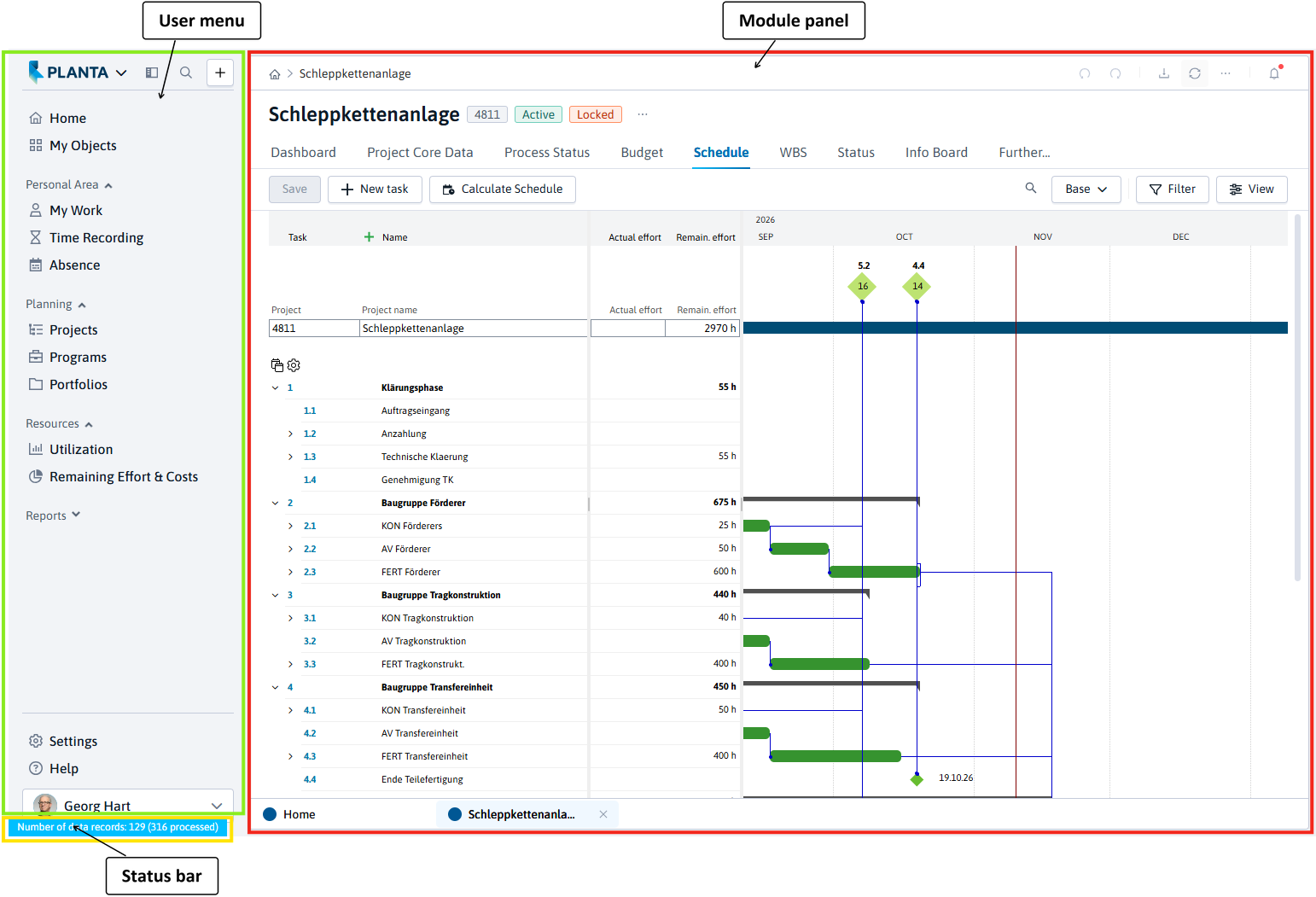
The PLANTA interface is divided into the following components:
-
on the left side there is the user menu (green), within which
-
the main menu (the PLANTA logo) with individual menus and next to it further menu items and buttons are displayed.
-
-
on the right side is the module panel (red), within which the following elements are contained:
-
at the very top the breadcrumbs navigation and on the right further menu items (that enable page actions) and notifications,
-
further below the title of the opened module panel and with badges and an overflow menu,
-
underneath the tabs of the corresponding modules of the panel
-
the opened (active) module with an action bar, that contains the buttons for the menu items that are relevant for the specific module context and features
-
and the tabs of the already opened module panels
-
-
at the lower left margin you will find the status bar (yellow), in which messages for the program run are displayed which you do not have to confirm, e.g.: Number of data records: 129 (316 processed) The status bar is not displayed permanently but only as soon as an action is triggered and disappears right after it was shown.
-
Status messages can appear in the classic status bar, as a pop-up message at the bottom of the screen, or as a persistent status chip in the module's Action Bar, as preferred.
-
Further interface elements like data fields, buttons, context menu, and tooltips can be found within the modules.
For a detailed description of the individual elements, please refer to the following topics: