
Introduction
-
Customizer → Layout Objects → Charts → Chart Configurations by Work Area → Click on the link of the required chart to open the Chart Customizer→

-
Customizer → Layout Objects → Charts → Chart Configurations Direct Editing → Click on the link of the required chart to open the Chart Customizer →
-
Open the required user module → Click on the button on a chart to open the Chart Customizer →
Information
-
In this module you can configure the appearance and position of the legend of a chart.
Note
-
The button for opening the Chart Customizer is only displayed to users with customizer rights.
Example
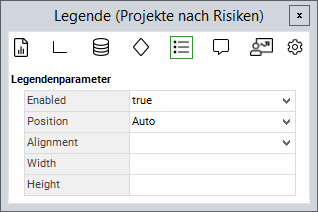
Legend Parameters
|
Attribute |
Explanation |
|---|---|
|
|
Activate/deactivate legend Possible values: |
|
|
Configures whether the legend is to be displayed left aligned, center aligned, or right aligned. Possible values: |
|
|
Position of the legend Possible values: |
|
|
Width of the legend |
|
|
Height of the legend |
|
|
Font size of the legend Can currently only be configured in expert mode. |
Note
-
As of DB 27, the
Paddingparameter is no longer used. The distance between the legend entries is automatically determined by the Web Client. Existing entries are deleted during the update.
- Tutorial: Chart-Customizing
- Tutorial: Chart Customizing
- Chart-Customizer
- Tutorial: Chart Customizing
- Tutorial: Chart Customizing
- Chart-Customizer
- Tutorial: Chart Customizing
- Tutorial: Chart Customizing
- Tutorial: Chart Customizing
- Charts customizen
- Tutorial: Chart Customizing
- Customize Charts
- Tutorial: Chart-Customizing
- Tutorial: Chart Customizing
- Tutorial: Chart-Customizing
- Customize Charts
- Tutorial: Chart-Customizing
- Charts customizen
- Tutorial: Chart-Customizing
- Tutorial: Chart-Customizing
- Chart Customizer
- Chart-Customizer
- Customize Charts
- Tutorial: Chart-Customizing
- Tutorial: Chart Customizing
- Customize Charts
- Charts customizen
- Charts customizen
- Customize Charts
- Tutorial: Chart-Customizing
- Charts customizen
- Charts customizen
- Tutorial: Chart-Customizing
- Customize Charts
- Charts customizen
- Chart Customizer
- Customize Charts
- Tutorial: Chart Customizing
- Chart Customizer
- Tutorial: Chart-Customizing