
Access
-
Customizer → Layout Objects → Charts → Chart Configurations by Work Area → Click on the link of the required chart to open the Chart Customizer →

-
Customizer → Layout Objects → Charts → Chart Configurations Direct Editing → Click on the link of the required chart to open the Chart Customizer →
-
Open the required user module → Click on the button on a chart to open the Chart Customizer →
-
Open the required user module → Click on the Start chart customizing button on a chart data field → Select a chart type in the Select Chart Type module →
Information
-
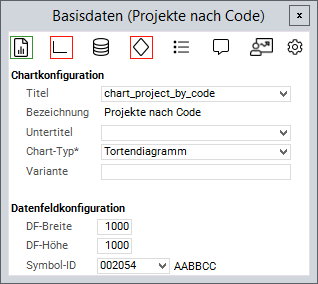
In this module, the descriptive data of a chart, e.g. title or chart type, can be specified and edited.
Note
-
The button for opening the Chart Customizers is only shown to users with customizer rights.
Example
Details
-
In the Title and Subtitle fields you can either enter fixed strings or the Python ID of a data field from the chart area.
-
If a Python ID is entered, the data field heading of the respective data field will be displayed in the language set for the user.
-
-
In the Name field, either the Title or, if available, the data field heading of the title will be displayed.
-
The name of the Variant is optional and only has to be specified if there are several chart configurations on the data field.
-
In the Color Range field you can select a color range for the chart.
-
In the Data field configuration area you can adjust DF height and DF width as well as the Symbol ID of the chart data field.
- Tutorial: Chart-Customizing
- Tutorial: Chart Customizing
- Chart-Customizer
- Tutorial: Chart Customizing
- Tutorial: Chart Customizing
- Chart-Customizer
- Tutorial: Chart Customizing
- Tutorial: Chart Customizing
- Charts customizen
- Tutorial: Chart Customizing
- Customize Charts
- Tutorial: Chart-Customizing
- Tutorial: Chart Customizing
- Tutorial: Chart-Customizing
- Customize Charts
- Tutorial: Chart-Customizing
- Charts customizen
- Tutorial: Chart-Customizing
- Tutorial: Chart-Customizing
- Chart Customizer
- Chart-Customizer
- Tutorial: Chart-Customizing
- Tutorial: Chart Customizing
- Customize Charts
- Charts customizen
- Charts customizen
- Customize Charts
- Tutorial: Chart-Customizing
- Charts customizen
- Charts customizen
- Tutorial: Chart-Customizing
- Customize Charts
- Charts customizen
- Chart Customizer
- Customize Charts
- Tutorial: Chart Customizing
- Chart Customizer
- Tutorial: Chart-Customizing