
Access
-
Customizer → Chart Customizer → Chart Configurations → Chart Configurations by Work Area → Open required chart →

-
Customizer → Chart Customizer → Chart Configurations → Chart Configurations Direct Editing → Open required chart →
-
Open the required user module → Click on the button on a chart →
Information
-
In this module you can configure the markers which are to be displayed on the data points of a data series.
Notes
-
If no data is displayed in a chart, this may indicate that no markers have been configured.
-
By default, the markers configured in the module are used for all data series of the chart.
-
Via the → Configure series specific marker context menu in the Data Series module you can insert a marker configuration which is only used for the respective data series.
-
Example
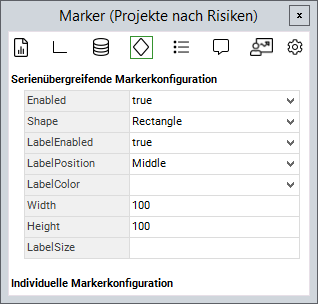
Attributes
|
Attribute |
Description |
|---|---|
|
|
Switch markers for the data series on/off Possible values: |
|
|
Shape of the markers Possible values:
|
|
|
Switch text on markers on/off Possible values: |
|
|
Position of the text Possible values:
|
|
|
Text color must be specified as a hexcode |
|
|
Width of the text |
|
|
Height of the text |
|
|
Font size of the text |


- Tutorial: Chart-Customizing
- Tutorial: Chart Customizing
- Chart-Customizer
- Tutorial: Chart Customizing
- Tutorial: Chart Customizing
- Chart-Customizer
- Tutorial: Chart Customizing
- Tutorial: Chart Customizing
- Charts customizen
- Tutorial: Chart Customizing
- Customize Charts
- Tutorial: Chart-Customizing
- Tutorial: Chart Customizing
- Tutorial: Chart-Customizing
- Customize Charts
- Tutorial: Chart-Customizing
- Charts customizen
- Tutorial: Chart-Customizing
- Tutorial: Chart-Customizing
- Chart Customizer
- Chart-Customizer
- Tutorial: Chart-Customizing
- Tutorial: Chart Customizing
- Customize Charts
- Charts customizen
- Charts customizen
- Customize Charts
- Tutorial: Chart-Customizing
- Charts customizen
- Charts customizen
- Tutorial: Chart-Customizing
- Customize Charts
- Charts customizen
- Chart Customizer
- Customize Charts
- Tutorial: Chart Customizing
- Chart Customizer
- Tutorial: Chart-Customizing